S3 Load
AWS S3 からデータをロードする
StarRocks は AWS S3 からデータをロードするために以下のオプションを提供しています。
- Synchronous loading using INSERT+
FILES() - Asynchronous loading using Broker Load
- Continuous asynchronous loading using Pipe
Each of these options has its own advantages, which are detailed in the following sections.
In most cases, we recommend that you use the INSERT+FILES() method, which is much easier to use.
However, the INSERT+FILES() method currently supports only the Parquet and ORC file formats. Therefore, if you need to load data of other file formats such as CSV, or perform data changes such as DELETE during data loading, you can resort to Broker Load.
If you need to load a large number of data files with a significant data volume in total (for example, more than 100 GB or even 1 TB), we recommend that you use the Pipe method. Pipe can split the files based on their number or size, breaking down the load job into smaller, sequential tasks. This approach ensures that errors in one file do not impact the entire load job and minimizes the need for retries due to data errors.
始める前に
ソースデータの準備
StarRocks にロードしたいソースデータが S3 バケットに適切に保存されていることを確認してください。また、データとデータベースがどこにあるかを考慮することもお勧めします。バケットと StarRocks クラスターが同じリージョンにある場合、データ転送コストは大幅に低くなります。
このトピックでは、S3 バケットにあるサンプルデータセット s3://starrocks-examples/user-behavior-10-million-rows.parquet を提供します。このオブジェクトは、AWS 認証済みユーザーであれば誰でも読み取れるため、有効な資格情報でアクセスできます。
権限の確認
You can load data into StarRocks tables only as a user who has the INSERT privilege on those StarRocks tables. If you do not have the INSERT privilege, follow the instructions provided in GRANT to grant the INSERT privilege to the user that you use to connect to your StarRocks cluster. The syntax is GRANT INSERT ON TABLE <table_name> IN DATABASE <database_name> TO { ROLE <role_name> | USER <user_identity>}.
認証情報の収集
このトピックの例では、IAM ユーザーに基づく認証を使用します。AWS S3 からデータを読み取る権限があることを確認するために、IAM ユーザーに基づく認証の準備 を読み、適切な IAM ポリシー を設定した IAM ユーザーを作成する手順に従うことをお勧めします。
要するに、IAM ユーザーに基づく認証を実践する場合、次の AWS リソースに関する情報を収集する必要があります。
- データを保存している S3 バケット。
- バケット内の特定のオブジェクトにアクセスする場合の S3 オブジェクトキー(オブジェクト名)。S3 オブジェクトがサブフォルダに保存されている場合、オブジェクトキーにはプレフィックスを含めることができます。
- S3 バケットが属する AWS リージョン。
- アクセス資格情報として使用されるアクセスキーとシークレットキー。
利用可能なすべての認証方法については、AWS リソースへの認証 を参照してください。
INSERT+FILES() を使用する
この方法は v3.1 以降で利用可能で、現在は Parquet と ORC ファイル形式のみをサポートしています。
INSERT+FILES() の利点
FILES() は、指定したパス関連のプロパティに基づいてクラウドストレージに保存されたファイルを読み取り、ファイル内のデータのテーブルスキーマを推測し、データ行としてファイルからデータを返すことができます。
FILES() を使用すると、次のことができます。
- SELECT を使用して S3 から直接データをクエリする。
- CREATE TABLE AS SELECT (CTAS) を使用してテーブルを作成し、ロードする。
- INSERT を使用して既存のテーブルにデータをロードする。
典型的な例
SELECT を使用して S3 から直接クエリする
SELECT+FILES() を使用して S3 から直接クエリすることで、テーブルを作成する前にデータセットの内容をプレビューできます。例えば:
- データを保存せずにデータセットをプレビューする。
- 最小値と最大値をクエリし、使用するデータ型を決定する。
NULL値をチェックする。
次の例は、サンプルデータセット s3://starrocks-examples/user-behavior-10-million-rows.parquet をクエリします。
SELECT * FROM FILES
(
    "path" = "s3://starrocks-examples/user-behavior-10-million-rows.parquet",
    "format" = "parquet",
    "aws.s3.region" = "us-east-1",
    "aws.s3.access_key" = "AAAAAAAAAAAAAAAAAAAA",
    "aws.s3.secret_key" = "BBBBBBBBBBBBBBBBBBBBBBBBBBBBBBBBBBBBBBBB"
)
LIMIT 3;
NOTE
上記のコマンドで
AAAとBBBをあなたの資格情報に置き換えてください。オブジェクトは AWS 認証済みユーザーであれば誰でも読み取れるため、有効なaws.s3.access_keyとaws.s3.secret_keyを使用できます。
システムは次のクエリ結果を返します。
+--------+---------+------------+--------------+---------------------+
| UserID | ItemID  | CategoryID | BehaviorType | Timestamp           |
+--------+---------+------------+--------------+---------------------+
|      1 | 2576651 |     149192 | pv           | 2017-11-25 01:21:25 |
|      1 | 3830808 |    4181361 | pv           | 2017-11-25 07:04:53 |
|      1 | 4365585 |    2520377 | pv           | 2017-11-25 07:49:06 |
+--------+---------+------------+--------------+---------------------+
NOTE
上記で返された列名は Parquet ファイルによって提供されています。
CTAS を使用してテーブルを作成し、ロードする
これは前の例の続きです。前のクエリは CREATE TABLE AS SELECT (CTAS) でラップされ、スキーマ推測を使用してテーブル作成を自動化します。これは、StarRocks がテーブルスキーマを推測し、作成したいテーブルを作成し、データをテーブルにロードすることを意味します。Parquet ファイルを使用する場合、Parquet 形式には列名が含まれているため、FILES() テーブル関数を使用してテーブルを作成する際に列名と型を指定する必要はありません。
NOTE
スキーマ推測を使用する場合の CREATE TABLE の構文では、レプリカの数を設定することはできませんので、テーブルを作成する前に設定してください。以下の例は、1 つのレプリカを持つシステムの例です。
ADMIN SET FRONTEND CONFIG ('default_replication_num' = "1");
データベースを作成し、切り替えます。
CREATE DATABASE IF NOT EXISTS mydatabase;
USE mydatabase;
CTAS を使用してテーブルを作成し、サンプルデータセット s3://starrocks-examples/user-behavior-10-million-rows.parquet のデータをテーブルにロードします。
CREATE TABLE user_behavior_inferred AS
SELECT * FROM FILES
(
    "path" = "s3://starrocks-examples/user-behavior-10-million-rows.parquet",
    "format" = "parquet",
    "aws.s3.region" = "us-east-1",
    "aws.s3.access_key" = "AAAAAAAAAAAAAAAAAAAA",
    "aws.s3.secret_key" = "BBBBBBBBBBBBBBBBBBBBBBBBBBBBBBBBBBBBBBBB"
);
NOTE
上記のコマンドで
AAAとBBBをあなたの資格情報に置き換えてください。オブジェクトは AWS 認証済みユーザーであれば誰でも読み取れるため、有効なaws.s3.access_keyとaws.s3.secret_keyを使用できます。
テーブルを作成した後、DESCRIBE を使用してそのスキーマを表示できます。
DESCRIBE user_behavior_inferred;
システムは次のクエリ結果を返します。
+--------------+------------------+------+-------+---------+-------+
| Field        | Type             | Null | Key   | Default | Extra |
+--------------+------------------+------+-------+---------+-------+
| UserID       | bigint           | YES  | true  | NULL    |       |
| ItemID       | bigint           | YES  | true  | NULL    |       |
| CategoryID   | bigint           | YES  | true  | NULL    |       |
| BehaviorType | varchar(1048576) | YES  | false | NULL    |       |
| Timestamp    | varchar(1048576) | YES  | false | NULL    |       |
+--------------+------------------+------+-------+---------+-------+
テーブルにデータがロードされたことを確認するためにテーブルをクエリします。例:
SELECT * from user_behavior_inferred LIMIT 3;
次のクエリ結果が返され、データが正常にロードされたことを示しています。
+--------+---------+------------+--------------+---------------------+
| UserID | ItemID  | CategoryID | BehaviorType | Timestamp           |
+--------+---------+------------+--------------+---------------------+
| 225586 | 3694958 |    1040727 | pv           | 2017-12-01 00:58:40 |
| 225586 | 3726324 |     965809 | pv           | 2017-12-01 02:16:02 |
| 225586 | 3732495 |    1488813 | pv           | 2017-12-01 00:59:46 |
+--------+---------+------------+--------------+---------------------+
INSERT を使用して既存のテーブルにロードする
挿入するテーブルをカスタマイズしたい場合があります。例えば:
- 列データ型、NULL 設定、またはデフォルト値
- キータイプと列
- データのパーティショニングとバケット化
NOTE
最も効率的なテーブル構造を作成するには、データの使用方法と列の内容に関する知識が必要です。このトピックではテーブル設計については扱いません。テーブル設計についての情報は、テーブルタイプ を参照してください。
この例では、テーブルがどのようにクエリされるか、および Parquet ファイル内のデータに関する知識に基づいてテーブルを作成しています。Parquet ファイル内のデータに関する知識は、S3 でファイルを直接クエリすることで得られます。
- S3 のデータセットのクエリにより、
Timestamp列が VARCHAR データ型に一致するデータを含んでいることが示され、StarRocks は VARCHAR から DATETIME へのキャストが可能であるため、以下の DDL ではデータ型が DATETIME に変更されています。 - S3 のデータをクエリすることで、データセットに
NULL値がないことがわかるため、DDL ではすべての列を非 NULL に設定することもできます。 - 予想されるクエリタイプに基づいて、ソートキーとバケット化列は
UserID列に設定されています。このデータに対するユースケースが異なる場合は、UserIDに加えて、または代わりにItemIDをソートキーとして使用することを決定するかもしれません。
データベースを作成し、切り替えます。
CREATE DATABASE IF NOT EXISTS mydatabase;
USE mydatabase;
手動でテーブルを作成します。
CREATE TABLE user_behavior_declared
(
    UserID int(11),
    ItemID int(11),
    CategoryID int(11),
    BehaviorType varchar(65533),
    Timestamp datetime
)
ENGINE = OLAP
DUPLICATE KEY(UserID)
DISTRIBUTED BY HASH(UserID);
スキーマを表示して、FILES() テーブル関数によって推測されたスキーマと比較できるようにします。
DESCRIBE user_behavior_declared;
+--------------+----------------+------+-------+---------+-------+
| Field        | Type           | Null | Key   | Default | Extra |
+--------------+----------------+------+-------+---------+-------+
| UserID       | int            | YES  | true  | NULL    |       |
| ItemID       | int            | YES  | false | NULL    |       |
| CategoryID   | int            | YES  | false | NULL    |       |
| BehaviorType | varchar(65533) | YES  | false | NULL    |       |
| Timestamp    | datetime       | YES  | false | NULL    |       |
+--------------+----------------+------+-------+---------+-------+
作成したスキーマを、FILES() テーブル関数を使用して以前に推測されたスキーマと比較してください。以下を確認します。
- データ型
- NULL 設定
- キーフィールド
ターゲットテーブルのスキーマをよりよく制御し、クエリパフォーマンスを向上させるために、プロダクション環境では手動でテーブルスキーマを指定することをお勧めします。
テーブルを作成した後、INSERT INTO SELECT FROM FILES() を使用してロードできます。
INSERT INTO user_behavior_declared
SELECT * FROM FILES
(
    "path" = "s3://starrocks-examples/user-behavior-10-million-rows.parquet",
    "format" = "parquet",
    "aws.s3.region" = "us-east-1",
    "aws.s3.access_key" = "AAAAAAAAAAAAAAAAAAAA",
    "aws.s3.secret_key" = "BBBBBBBBBBBBBBBBBBBBBBBBBBBBBBBBBBBBBBBB"
);
NOTE
上記のコマンドで
AAAとBBBをあなたの資格情報に置き換えてください。オブジェクトは AWS 認証済みユーザーであれば誰でも読み取れるため、有効なaws.s3.access_keyとaws.s3.secret_keyを使用できます。
ロードが完了した後、テーブルをクエリしてデータがロードされたことを確認できます。例:
SELECT * from user_behavior_declared LIMIT 3;
次のクエリ結果が返され、データが正常にロードされたことを示しています。
+--------+---------+------------+--------------+---------------------+
| UserID | ItemID  | CategoryID | BehaviorType | Timestamp           |
+--------+---------+------------+--------------+---------------------+
| 393529 | 3715112 |     883960 | pv           | 2017-12-02 02:45:44 |
| 393529 | 2650583 |     883960 | pv           | 2017-12-02 02:45:59 |
| 393529 | 3715112 |     883960 | pv           | 2017-12-02 03:00:56 |
+--------+---------+------------+--------------+---------------------+
ロードの進捗を確認する
StarRocks Information Schema の loads ビューから INSERT ジョブの進捗をクエリできます。この機能は v3.1 以降でサポートされています。例:
SELECT * FROM information_schema.loads ORDER BY JOB_ID DESC;
loads ビューで提供されるフィールドに関する情報は、loads を参照してください。
複数のロードジョブを送信した場合は、ジョブに関連付けられた LABEL でフィルタリングできます。例:
SELECT * FROM information_schema.loads WHERE LABEL = 'insert_e3b882f5-7eb3-11ee-ae77-00163e267b60' \G
*************************** 1. row ***************************
              JOB_ID: 10243
               LABEL: insert_e3b882f5-7eb3-11ee-ae77-00163e267b60
       DATABASE_NAME: mydatabase
               STATE: FINISHED
            PROGRESS: ETL:100%; LOAD:100%
                TYPE: INSERT
            PRIORITY: NORMAL
           SCAN_ROWS: 10000000
       FILTERED_ROWS: 0
     UNSELECTED_ROWS: 0
           SINK_ROWS: 10000000
            ETL_INFO:
           TASK_INFO: resource:N/A; timeout(s):300; max_filter_ratio:0.0
         CREATE_TIME: 2023-11-09 11:56:01
      ETL_START_TIME: 2023-11-09 11:56:01
     ETL_FINISH_TIME: 2023-11-09 11:56:01
     LOAD_START_TIME: 2023-11-09 11:56:01
    LOAD_FINISH_TIME: 2023-11-09 11:56:44
         JOB_DETAILS: {"All backends":{"e3b882f5-7eb3-11ee-ae77-00163e267b60":[10142]},"FileNumber":0,"FileSize":0,"InternalTableLoadBytes":311710786,"InternalTableLoadRows":10000000,"ScanBytes":581574034,"ScanRows":10000000,"TaskNumber":1,"Unfinished backends":{"e3b882f5-7eb3-11ee-ae77-00163e267b60":[]}}
           ERROR_MSG: NULL
        TRACKING_URL: NULL
        TRACKING_SQL: NULL
REJECTED_RECORD_PATH: NULL
NOTE
INSERT は同期コマンドです。INSERT ジョブがまだ実行中の場合、その実行ステータスを確認するには別のセッションを開く必要があります。
Broker Load を使用する
非同期の Broker Load プロセスは、S3 への接続を確立し、データを取得し、StarRocks にデータを保存します。
この方法は次のファイル形式をサポートしています。
- Parquet
- ORC
- CSV
- JSON (v3.2.3 以降でサポート)
Broker Load の利点
- Broker Load はバックグラウンドで実行され、クライアントはジョブが続行するために接続を維持する必要がありません。
- Broker Load は長時間実行されるジョブに適しており、デフォルトのタイムアウトは 4 時間です。
- Parquet と ORC ファイル形式に加えて、Broker Load は CSV ファイル形式と JSON ファイル形式をサポートしています (JSON ファイル形式は v3.2.3 以降でサポートされています)。
データフロー
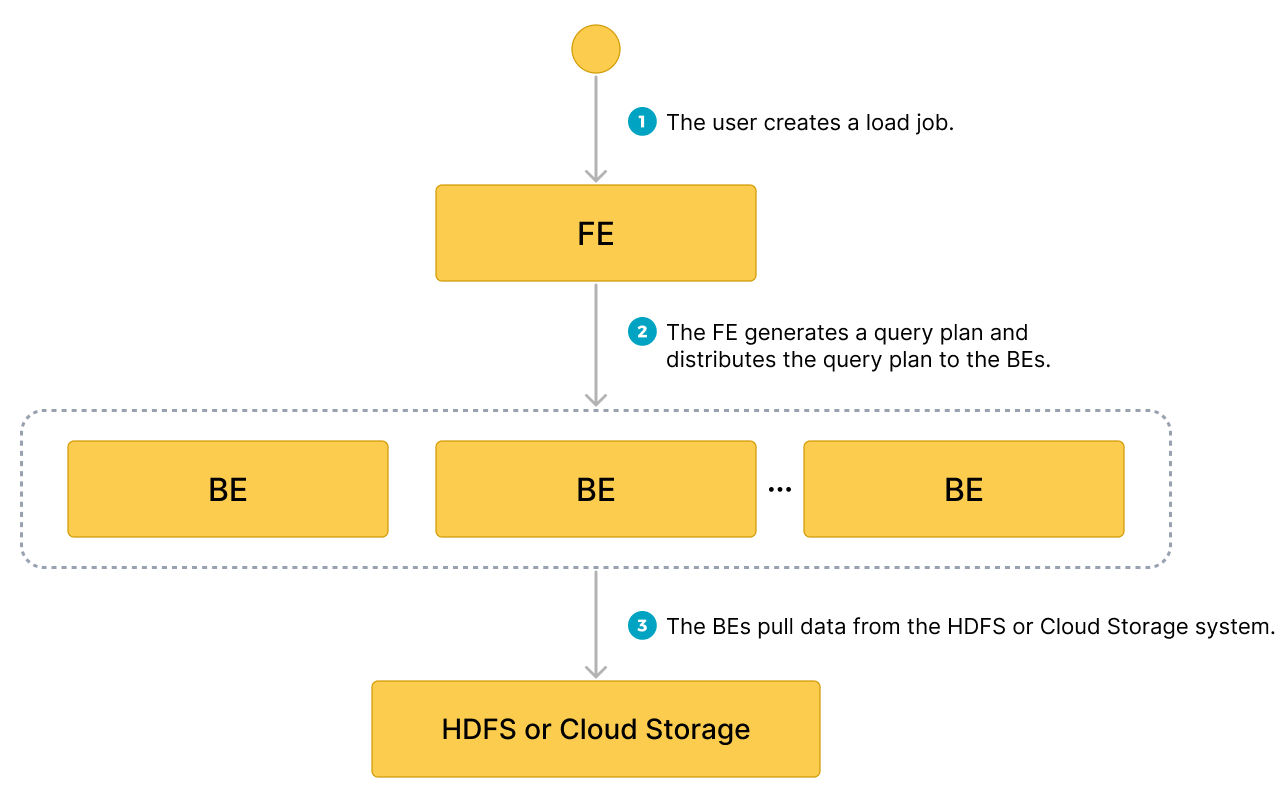
- ユーザーがロードジョブを作成します。
- フロントエンド (FE) がクエリプランを作成し、プランをバックエンドノード (BEs) またはコンピュートノード (CNs) に配布します。
- BEs または CNs がソースからデータを取得し、StarRocks にデータをロードします。
典型的な例
データベースとテーブルを作成し、S3 からサンプルデータセット s3://starrocks-examples/user-behavior-10-million-rows.parquet を取得するロードプロセスを開始し、データロードの進捗と成功を確認します。
データベースとテーブルを作成する
データベースを作成し、切り替えます。
CREATE DATABASE IF NOT EXISTS mydatabase;
USE mydatabase;
手動でテーブルを作成します(AWS S3 からロードしたい Parquet ファイルと同じスキーマを持つことをお勧めします)。
CREATE TABLE user_behavior
(
    UserID int(11),
    ItemID int(11),
    CategoryID int(11),
    BehaviorType varchar(65533),
    Timestamp datetime
)
ENGINE = OLAP
DUPLICATE KEY(UserID)
DISTRIBUTED BY HASH(UserID);
Broker Load を開始する
次のコマンドを実行して、サンプルデータセット s3://starrocks-examples/user-behavior-10-million-rows.parquet から user_behavior テーブルにデータをロードする Broker Load ジョブを開始します。
LOAD LABEL user_behavior
(
    DATA INFILE("s3://starrocks-examples/user-behavior-10-million-rows.parquet")
    INTO TABLE user_behavior
    FORMAT AS "parquet"
 )
 WITH BROKER
 (
    "aws.s3.enable_ssl" = "true",
    "aws.s3.use_instance_profile" = "false",
    "aws.s3.region" = "us-east-1",
    "aws.s3.access_key" = "AAAAAAAAAAAAAAAAAAAA",
    "aws.s3.secret_key" = "BBBBBBBBBBBBBBBBBBBBBBBBBBBBBBBBBBBBBBBB"
 )
PROPERTIES
(
    "timeout" = "72000"
);
NOTE
上記のコマンドで
AAAとBBBをあなたの資格情報に置き換えてください。オブジェクトは AWS 認証済みユーザーであれば誰でも読み取れるため、有効なaws.s3.access_keyとaws.s3.secret_keyを使用できます。
このジョブには 4 つの主要なセクションがあります。
LABEL: ロードジョブの状態をクエリする際に使用される文字列。LOAD宣言: ソース URI、ソースデータ形式、および宛先テーブル名。BROKER: ソースの接続詳細。PROPERTIES: タイムアウト値およびロードジョブに適用するその他のプロパティ。
詳細な構文とパラメータの説明については、BROKER LOAD を参照してください。
ロードの進捗を確認する
StarRocks Information Schema の loads ビューから Broker Load ジョブの進捗をクエリできます。この機能は v3.1 以降でサポートされています。
SELECT * FROM information_schema.loads WHERE LABEL = 'user_behavior';
loads ビューで提供されるフィールドに関する情報は、loads を参照してください。
このレコードは LOADING の状態を示し、進捗は 39% です。類似の状態が表示された場合は、FINISHED の状態が表示されるまでコマンドを再実行してください。
              JOB_ID: 10466
               LABEL: user_behavior
       DATABASE_NAME: mydatabase
               STATE: LOADING
            PROGRESS: ETL:100%; LOAD:39%
                TYPE: BROKER
            PRIORITY: NORMAL
           SCAN_ROWS: 4620288
       FILTERED_ROWS: 0
     UNSELECTED_ROWS: 0
           SINK_ROWS: 4620288
            ETL_INFO:
           TASK_INFO: resource:N/A; timeout(s):72000; max_filter_ratio:0.0
         CREATE_TIME: 2024-02-28 22:11:36
      ETL_START_TIME: 2024-02-28 22:11:41
     ETL_FINISH_TIME: 2024-02-28 22:11:41
     LOAD_START_TIME: 2024-02-28 22:11:41
    LOAD_FINISH_TIME: NULL
         JOB_DETAILS: {"All backends":{"2fb97223-b14c-404b-9be1-83aa9b3a7715":[10004]},"FileNumber":1,"FileSize":136901706,"InternalTableLoadBytes":144032784,"InternalTableLoadRows":4620288,"ScanBytes":143969616,"ScanRows":4620288,"TaskNumber":1,"Unfinished backends":{"2fb97223-b14c-404b-9be1-83aa9b3a7715":[10004]}}
           ERROR_MSG: NULL
        TRACKING_URL: NULL
        TRACKING_SQL: NULL
REJECTED_RECORD_PATH: NULL
ロードジョブが完了したことを確認した後、宛先テーブルのサブセットを確認してデータが正常にロードされたかどうかを確認できます。例:
SELECT * from user_behavior LIMIT 3;
次のクエリ結果が返され、データが正常にロードされたことを示しています。
+--------+---------+------------+--------------+---------------------+
| UserID | ItemID  | CategoryID | BehaviorType | Timestamp           |
+--------+---------+------------+--------------+---------------------+
|     34 |  856384 |    1029459 | pv           | 2017-11-27 14:43:27 |
|     34 | 5079705 |    1029459 | pv           | 2017-11-27 14:44:13 |
|     34 | 4451615 |    1029459 | pv           | 2017-11-27 14:45:52 |
+--------+---------+------------+--------------+---------------------+
Pipe を使用する
v3.2 以降、StarRocks は Pipe ロード方法を提供しており、現在は Parquet と ORC ファイル形式のみをサポートしています。
Pipe の利点
Pipe is ideal for continuous data loading and large-scale data loading:
-
Large-scale data loading in micro-batches helps reduce the cost of retries caused by data errors.
With the help of Pipe, StarRocks enables the efficient loading of a large number of data files with a significant data volume in total. Pipe automatically splits the files based on their number or size, breaking down the load job into smaller, sequential tasks. This approach ensures that errors in one file do not impact the entire load job. The load status of each file is recorded by Pipe, allowing you to easily identify and fix files that contain errors. By minimizing the need for retries due to data errors, this approach helps to reduce costs.
-
Continuous data loading helps reduce manpower.
Pipe helps you write new or updated data files to a specific location and continuously load the new data from these files into StarRocks. After you create a Pipe job with
"AUTO_INGEST" = "TRUE"specified, it will constantly monitor changes to the data files stored in the specified path and automatically load new or updated data from the data files into the destination StarRocks table.
Additionally, Pipe performs file uniqueness checks to help prevent duplicate data loading.During the loading process, Pipe checks the uniqueness of each data file based on the file name and digest. If a file with a specific file name and digest has already been processed by a Pipe job, the Pipe job will skip all subsequent files with the same file name and digest. Note that object storage like AWS S3 uses ETag as file digest.
The load status of each data file is recorded and saved to the information_schema.pipe_files view. After a Pipe job associated with the view is deleted, the records about the files loaded in that job will also be deleted.
Data flow
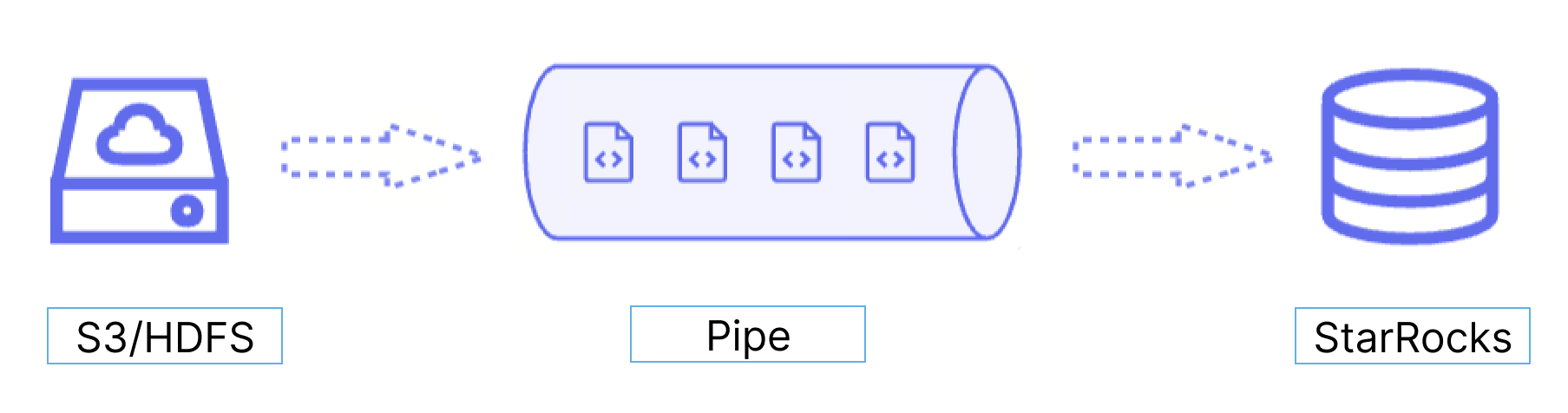
Pipe は継続的なデータロードと大規模なデータロードに最適です。
-
マイクロバッチでの大規模データロードは、データエラーによる再試行のコストを削減するのに役立ちます。
Pipe の助けを借りて、StarRocks は大量のデータファイルを効率的にロードできます。Pipe はファイルの数やサイズに基づいて自動的にファイルを分割し、ロードジョブを小さな連続タスクに分解します。このアプローチにより、1 つのファイルのエラーが全体のロードジョブに影響を与えないようにします。Pipe は各ファイルのロードステータスを記録し、エラーを含むファイルを簡単に特定して修正できるようにします。データエラーによる再試行の必要性を最小限に抑えることで、このアプローチはコストを削減するのに役立ちます。
-
継続的なデータロードは人手を削減するのに役立ちます。
Pipe は、新しいまたは更新されたデータファイルを特定の場所に書き込み、これらのファイルから新しいデータを継続的に StarRocks にロードするのに役立ちます。
"AUTO_INGEST" = "TRUE"を指定して Pipe ジョブを作成すると、指定されたパスに保存されたデータファイルの変更を常に監視し、データファイルから新しいまたは更新されたデータを自動的に宛先の StarRocks テーブルにロードします。
さらに、Pipe はファイルの一意性チェックを実行して、重複データのロードを防ぐのに役立ちます。ロードプロセス中、Pipe はファイル名とダイジェストに基づいて各データファイルの一意性をチェックします。特定のファイル名とダイジェストを持つファイルがすでに Pipe ジョブによって処理されている場合、Pipe ジョブは同じファイル名とダイジェストを持つ後続のすべてのファイルをスキップします。AWS S3 のようなオブジェクトストレージは、ETag をファイルダイジェストとして使用します。
各データファイルのロードステータスは information_schema.pipe_files ビューに記録され保存されます。ビューに関連付けられた Pipe ジョブが削除されると、そのジョブでロードされたファイルに関するレコードも削除されます。
Pipe と INSERT+FILES() の違い
Pipe ジョブは、各データファイルのサイズと行数に基づいて 1 つ以上のトランザクションに分割されます。ユーザーはロードプロセス中に中間結果をクエリできます。対照的に、INSERT+FILES() ジョブは単一のトランザクションとして処理され、ユーザーはロードプロセス中にデータを表示することはできません。
ファイルロードの順序
各 Pipe ジョブに対して、StarRocks はファイルキューを維持し、そこからマイクロバッチとしてデータファイルを取得してロードします。Pipe は、データファイルがアップロードされた順序でロードされることを保証しません。したがって、新しいデータが古いデータよりも先にロードされる場合があります。
典型的な例
データベースとテーブルを作成する
データベースを作成し、切り替えます。
CREATE DATABASE IF NOT EXISTS mydatabase;
USE mydatabase;
手動でテーブルを作成します(AWS S3 からロードしたい Parquet ファイルと同じスキーマを持つことをお勧めします)。
CREATE TABLE user_behavior_from_pipe
(
    UserID int(11),
    ItemID int(11),
    CategoryID int(11),
    BehaviorType varchar(65533),
    Timestamp datetime
)
ENGINE = OLAP
DUPLICATE KEY(UserID)
DISTRIBUTED BY HASH(UserID);
Pipe ジョブを開始する
次のコマンドを実行して、サンプルデータセット s3://starrocks-examples/user-behavior-10-million-rows/ から user_behavior_from_pipe テーブルにデータをロードする Pipe ジョブを開始します。この Pipe ジョブは、マイクロバッチと継続的なロード(上記で説明)という Pipe 固有の機能の両方を使用します。
このガイドの他の例では、1 つの Parquet ファイルに 1,000 万行のデータをロードします。Pipe の例では、同じデータセットが 57 の個別のファイルに分割され、これらはすべて 1 つの S3 フォルダに保存されます。以下の CREATE PIPE コマンドで、path は S3 フォルダの URI であり、ファイル名を指定する代わりに URI は /* で終わります。AUTO_INGEST を設定し、個々のファイルではなくフォルダを指定することで、Pipe ジョブは S3 フォルダをポーリングして新しいファイルを検出し、それらをフォルダに追加されるとすぐに取り込むことができます。
CREATE PIPE user_behavior_pipe
PROPERTIES
(
    "AUTO_INGEST" = "TRUE"
)
AS
INSERT INTO user_behavior_from_pipe
SELECT * FROM FILES
(
    "path" = "s3://starrocks-examples/user-behavior-10-million-rows/*",
    "format" = "parquet",
    "aws.s3.region" = "us-east-1",
    "aws.s3.access_key" = "AAAAAAAAAAAAAAAAAAAA",
    "aws.s3.secret_key" = "BBBBBBBBBBBBBBBBBBBBBBBBBBBBBBBBBBBBBBBB"
);
NOTE
上記のコマンドで
AAAとBBBをあなたの資格情報に置き換えてください。オブジェクトは AWS 認証済みユーザーであれば誰でも読み取れるため、有効なaws.s3.access_keyとaws.s3.secret_keyを使用できます。
このジョブには 4 つの主要なセクションがあります。
pipe_name: Pipe の名前。Pipe 名は、Pipe が属するデータベース内で一意である必要があります。INSERT_SQL: 指定されたソースデータファイルから宛先テーブルにデータをロードするために使用される INSERT INTO SELECT FROM FILES ステートメント。PROPERTIES: Pipe を実行する方法を指定する一連のオプションパラメータ。これにはAUTO_INGEST、POLL_INTERVAL、BATCH_SIZE、BATCH_FILESが含まれます。これらのプロパティは"key" = "value"形式で指定します。
詳細な構文とパラメータの説明については、CREATE PIPE を参照してください。
ロードの進捗を確認する
-
現在のデータベースに属する Pipe ジョブの進捗を SHOW PIPES を使用してクエリします。
SHOW PIPES WHERE NAME = 'user_behavior_pipe' \G
  The following result is returned:

  :::tip
  In the output shown below the pipe is in the `RUNNING` state. A pipe will stay in the `RUNNING` state until you manually stop it. The output also shows the number of files loaded (57) and the last time that a file was loaded.
  :::

  ```SQL
  *************************** 1. row ***************************
  DATABASE_NAME: mydatabase
        PIPE_ID: 10476
      PIPE_NAME: user_behavior_pipe
          STATE: RUNNING
     TABLE_NAME: mydatabase.user_behavior_from_pipe
    LOAD_STATUS: {"loadedFiles":57,"loadedBytes":295345637,"loadingFiles":0,"lastLoadedTime":"2024-02-28 22:14:19"}
     LAST_ERROR: NULL
   CREATED_TIME: 2024-02-28 22:13:41
  1 row in set (0.02 sec)
-
Query the progress of the Pipe job from the
pipesview in the StarRocks Information Schema.SELECT * FROM information_schema.pipes WHERE pipe_name = 'user_behavior_replica' \GThe following result is returned:
ヒントSome of the queries in this guide end in
\Ginstead of a semicolon (;). This causes the MySQL client to output the results in vertical format. If you are using DBeaver or another client you may need to use a semicolon (;) rather than\G.*************************** 1. row ***************************
DATABASE_NAME: mydatabase
PIPE_ID: 10217
PIPE_NAME: user_behavior_replica
STATE: RUNNING
TABLE_NAME: mydatabase.user_behavior_replica
LOAD_STATUS: {"loadedFiles":1,"loadedBytes":132251298,"loadingFiles":0,"lastLoadedTime":"2023-11-09 15:35:42"}
LAST_ERROR:
CREATED_TIME: 9891-01-15 07:51:45
1 row in set (0.01 sec)
Check file status
You can query the load status of the files loaded from the pipe_files view in the StarRocks Information Schema.
SELECT * FROM information_schema.pipe_files WHERE pipe_name = 'user_behavior_replica' \G
The following result is returned:
*************************** 1. row ***************************
   DATABASE_NAME: mydatabase
         PIPE_ID: 10217
       PIPE_NAME: user_behavior_replica
       FILE_NAME: s3://starrocks-examples/user-behavior-10-million-rows.parquet
    FILE_VERSION: e29daa86b1120fea58ad0d047e671787-8
       FILE_SIZE: 132251298
   LAST_MODIFIED: 2023-11-06 13:25:17
      LOAD_STATE: FINISHED
     STAGED_TIME: 2023-11-09 15:35:02
 START_LOAD_TIME: 2023-11-09 15:35:03
FINISH_LOAD_TIME: 2023-11-09 15:35:42
       ERROR_MSG:
1 row in set (0.03 sec)
Manage Pipe jobs
You can alter, suspend or resume, drop, or query the pipes you have created and retry to load specific data files. For more information, see ALTER PIPE, SUSPEND or RESUME PIPE, DROP PIPE, SHOW PIPES, and RETRY FILE.
