Setup StarRocks FE 開発環境を IDEA で設定する
このチュートリアルは macOS に基づいており、Apple Chip(M1, M2)でテストされています。macOS を使用していない場合でも、このチュートリアルを参考にすることができます。
必要条件
Thrift 0.13
公式の brew リポジトリには Thrift の 0.13 バージョンが存在しません。私たちのコミッターの一人が、自分のリポジトリにインストール用のバージョンを作成しました。
brew install alberttwong/thrift/thrift@0.13
Thrift を正常にインストールした後、次のコマンドを実行して確認できます。
$ thrift -version
Thrift version 0.13.0
Protobuf
最新バージョン v3 を使用してください。なぜなら、最新バージョンの Protobuf は StarRocks で使用されている v2 バージョンの Protobuf と互換性があるからです。
brew install protobuf
Maven
brew install maven
Openjdk 1.8 または 11
brew install openjdk@11
Python3
MacOS にはデフォルトでインストールされています。
各自の Thrift と Protobuf のインストールディレクトリは異なる場合があります。brew list コマンドを使用して確認できます。
brew list thrift@0.13.0
brew list protobuf
StarRocks の設定
StarRocks のダウンロード
git clone https://github.com/StarRocks/starrocks.git
thirdparty ディレクトリの設定
thirdparty に installed/bin ディレクトリを作成します。
cd starrocks && mkdir -p thirdparty/installed/bin
次に、Thrift と Protobuf のソフトリンクをそれぞれ作成します。
ln -s /opt/homebrew/bin/thrift thirdparty/installed/bin/thrift
ln -s /opt/homebrew/bin/protoc thirdparty/installed/bin/protoc
環境変数の設定
export JAVA_HOME="/opt/homebrew/Cellar/openjdk@11/11.0.15" # 注意: jdk バージョンはデスクトップによって異なる場合があります
export PYTHON=/usr/bin/python3
export STARROCKS_THIRDPARTY=$(pwd)/thirdparty # 注意: starrocks ディレクトリにいることを確認してください
ソースコードの生成
FE の多くのソースファイルは手動で生成する必要があります。そうしないと、IDEA はファイルが不足しているためエラーを報告します。次のコマンドを実行して自動的に生成します。
make -C gensrc script
./build.sh --be --configure-only
cmake --build be/build_Release --target be_proto_codegen be_thrift_codegen
生成された BE の thrift/protobuf C++ ファイルは、be/build_Release/gensrc/gen_cpp のようなアクティブな build ディレクトリ配下に配置されます。
FE のコンパイル
fe ディレクトリに入り、Maven を使用してコンパイルします。
cd fe
mvn install -DskipTests
IDEA で StarRocks を開く
-
IDEA で
StarRocksディレクトリを開きます。 -
コーディングスタイル設定を追加する コーディングスタイルを標準化するために、IDEA で
fe/starrocks_intellij_style.xmlコードスタイルファイルをインポートする必要があります。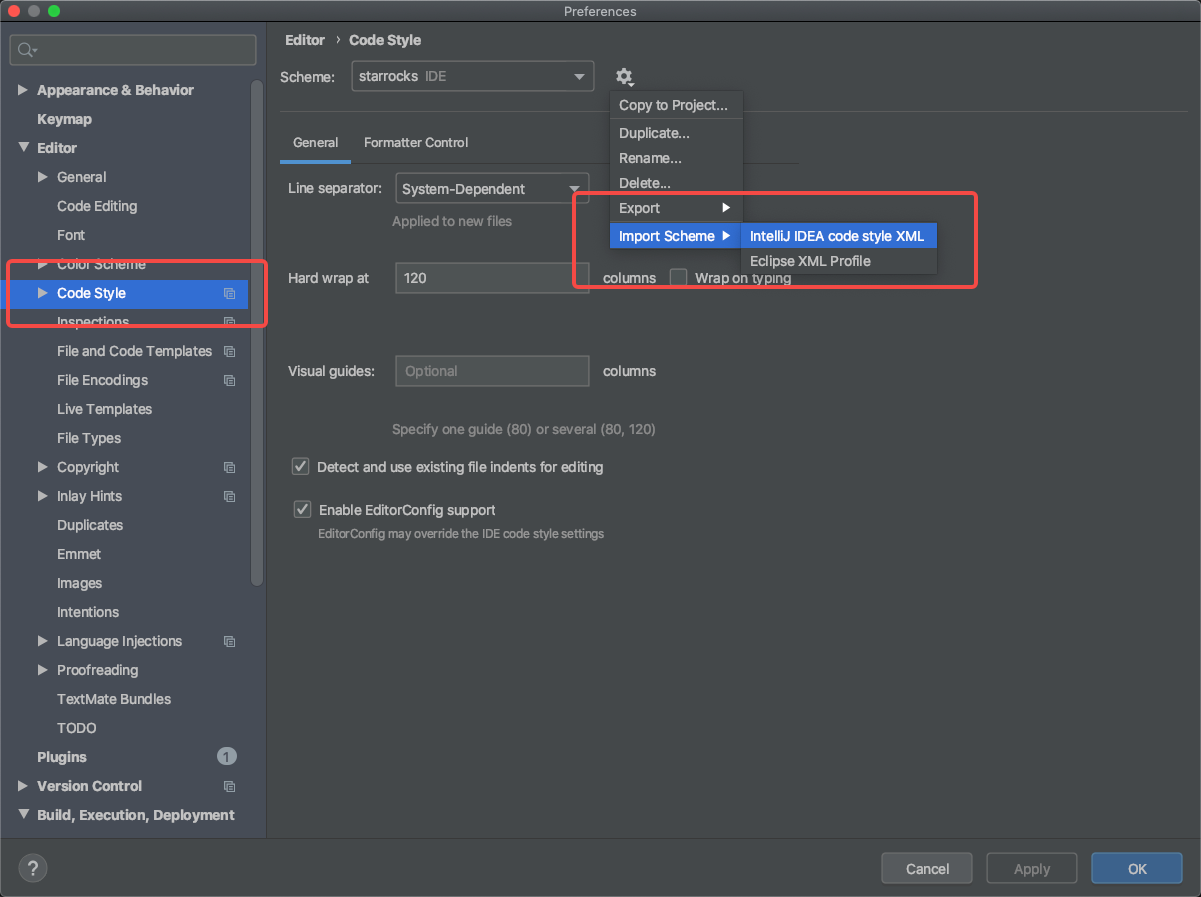
MacOS で StarRocks FE を実行する
IDEA を使用して fe ディレクトリを開きます。
StarRocksFE.java の Main 関数を直接実行すると、いくつかのエラーが報告されます。スムーズに実行するためには、いくつかの簡単な設定を行うだけで済みます。
注意: StarRocksFE.java は fe/fe-core/src/main/java/com/starrocks ディレクトリにあります。
- StarRocks ディレクトリから
feディレクトリに conf、bin、webroot ディレクトリをコピーします。
cp -r conf fe/conf
cp -r bin fe/bin
cp -r webroot fe/webroot
feディレクトリに入り、feディレクトリの下に log と meta フォルダを作成します。
cd fe
mkdir log
mkdir meta
- 環境変数を設定します。以下の図のように設定します。
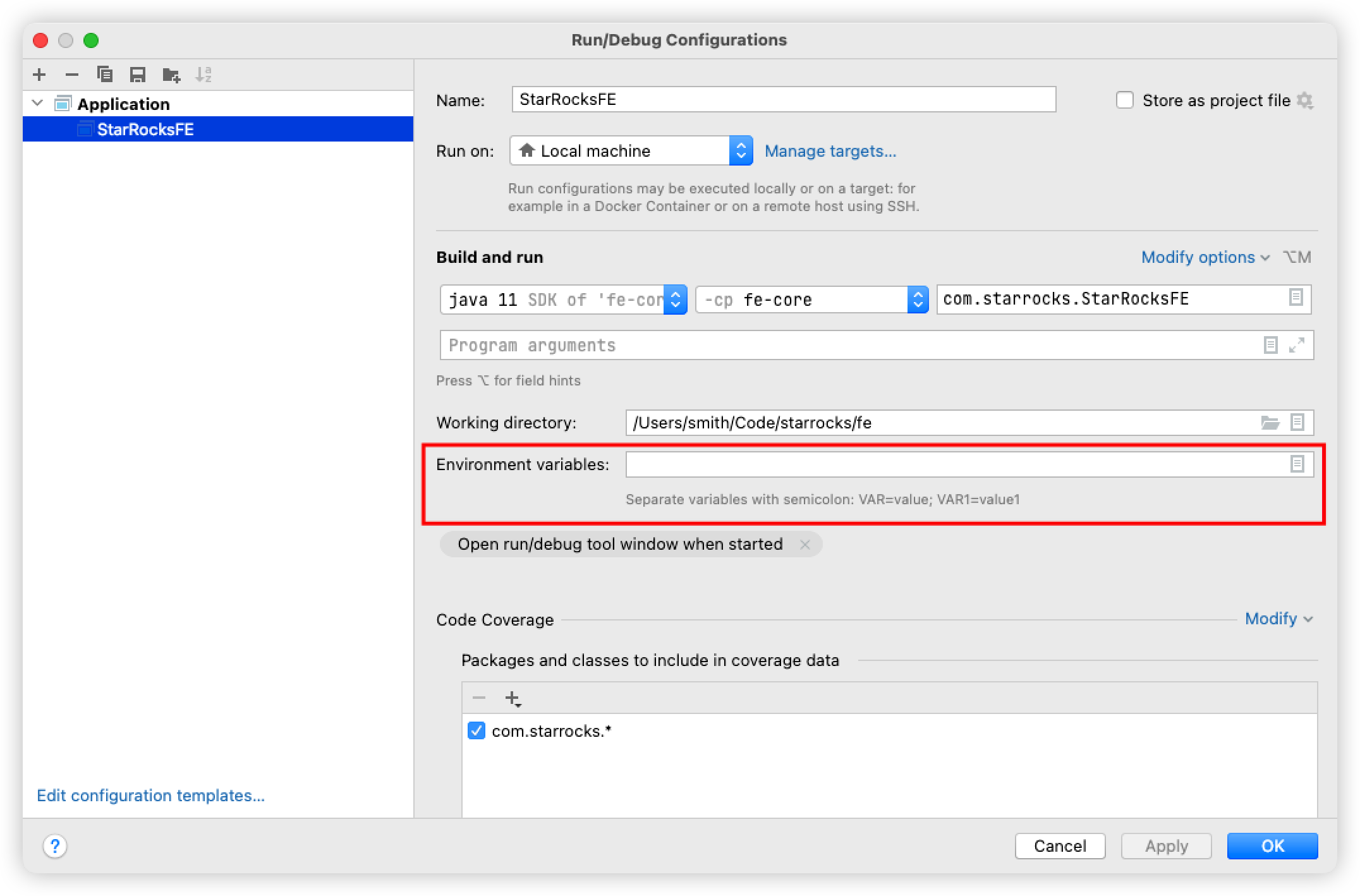
export PID_DIR=/Users/smith/Code/starrocks/fe/bin
export STARROCKS_HOME=/Users/smith/Code/starrocks/fe
export LOG_DIR=/Users/smith/Code/starrocks/fe/log
-
fe/conf/fe.confの priority_networks を127.0.0.1/24に変更して、FE が現在のコンピュータの LAN IP を使用し、ポートのバインドに失敗するのを防ぎます。 -
これで StarRocks FE が正常に実行されました。
MacOS で StarRocks FE をデバッグする
デバッグオプションで FE を開始した場合、IDEA デバッガを FE プロセスにアタッチできます。
./start_fe.sh --debug
https://www.jetbrains.com/help/idea/attaching-to-local-process.html#attach-to-local を参照してください。
