共有データに HDFS を使用する
This topic describes how to deploy and use a shared-data StarRocks cluster. This feature is supported from v3.0 for S3 compatible storage and v3.1 for Azure Blob Storage.
NOTE
- StarRocks version 3.1 brings some changes to the shared-data deployment and configuration. Please use this document if you are running version 3.1 or higher.
- If you are running version 3.0 please use the 3.0 documentation.
- Shared-data StarRocks clusters do not support data BACKUP and RESTORE.
The shared-data StarRocks cluster is specifically engineered for the cloud on the premise of separation of storage and compute. It allows data to be stored in object storage (for example, AWS S3, Google GCS, Azure Blob Storage, and MinIO). You can achieve not only cheaper storage and better resource isolation, but elastic scalability for your cluster. The query performance of the shared-data StarRocks cluster aligns with that of a shared-nothing StarRocks cluster when the local disk cache is hit.
In version 3.1 and higher the StarRocks shared-data cluster is made up of Frontend Engines (FEs) and Compute Nodes (CNs). The CNs replace the classic Backend Engines (BEs) in shared-data clusters.
Compared to the classic shared-nothing StarRocks architecture, separation of storage and compute offers a wide range of benefits. By decoupling these components, StarRocks provides:
- Inexpensive and seamlessly scalable storage.
- Elastic scalable compute. Because data is not stored in Compute Nodes (CNs), scaling can be done without data migration or shuffling across nodes.
- Local disk cache for hot data to boost query performance.
- Asynchronous data ingestion into object storage, allowing a significant improvement in loading performance.
アーキテクチャ
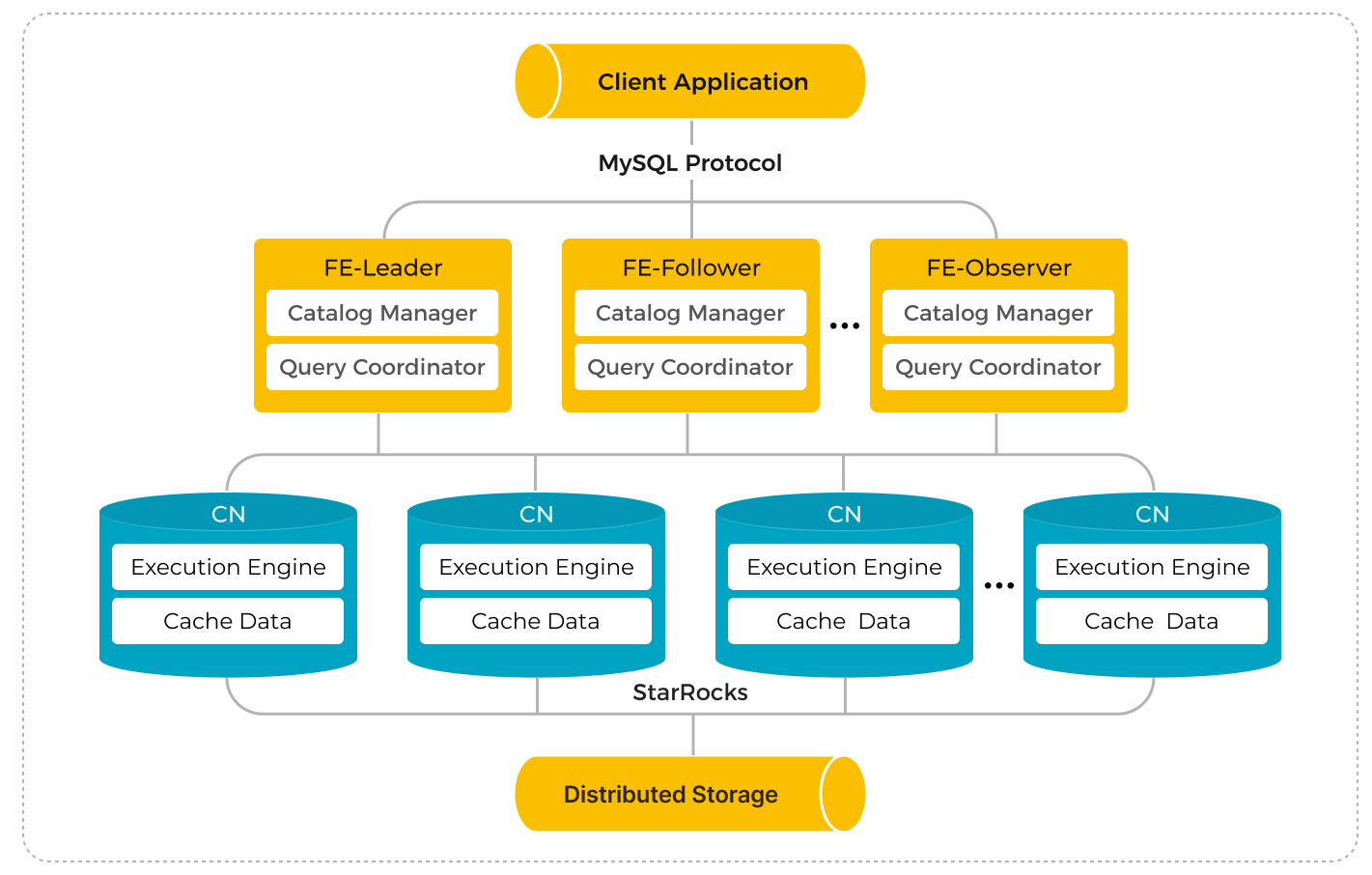
共有データ StarRocks クラスタをデプロイする
共有データ StarRocks クラスタのデプロイは、共有なし StarRocks クラスタのデプロイと似ています。唯一の違いは、共有データクラスタでは BEs の代わりに CNs をデプロイする必要があることです。このセクションでは、共有データ StarRocks クラスタをデプロイする際に、FE と CN の設定ファイル fe.conf と cn.conf に追加する必要がある追加の FE と CN の設定項目のみをリストします。StarRocks クラスタのデプロイに関する詳細な手順については、 Deploy StarRocks を参照してください。
注意
このドキュメントの次のセクションで共有ストレージ用に設定するまで、クラスタを起動しないでください。
共有データ StarRocks 用の FE ノードを設定する
FEs を起動する前に、FE 設定ファイル fe.conf に次の設定項目を追加します。
HDFS 用の FE 設定例
各 FE ノードの fe.conf ファイルに追加する共有データの例です。
run_mode = shared_data
cloud_native_meta_port = <meta_port>
cloud_native_storage_type = HDFS

# 例: hdfs://127.0.0.1:9000/user/starrocks/
cloud_native_hdfs_url = <hdfs_url>
HDFS を使用した共有ストレージに関連するすべての FE パラメータ
run_mode
StarRocks クラスタの実行モード。有効な値:
shared_datashared_nothing(デフォルト)
注意
- StarRocks クラスタで
shared_dataとshared_nothingモードを同時に採用することはできません。混合デプロイはサポートされていません。- クラスタがデプロイされた後に
run_modeを変更しないでください。そうしないと、クラスタが再起動できなくなります。共有なしクラスタから共有データクラスタへの変換、またはその逆はサポートされていません。
cloud_native_meta_port
クラウドネイティブメタサービスの RPC ポート。
- デフォルト:
6090
enable_load_volume_from_conf
FE 設定ファイルに指定されたオブジェクトストレージ関連のプロパティを使用して、StarRocks がデフォルトのストレージボリュームを作成できるかどうか。有効な値:
true(デフォルト) 新しい共有データクラスタを作成する際にこの項目をtrueに指定すると、StarRocks は FE 設定ファイルのオブジェクトストレージ関連のプロパティを使用して組み込みストレージボリュームbuiltin_storage_volumeを作成し、それをデフォルトのストレージボリュームとして設定します。ただし、オブジェクトストレージ関連のプロパティを指定していない場合、StarRocks は起動に失敗します。false新しい共有データクラスタを作成する際にこの項目をfalseに指定すると、StarRocks は組み込みストレージボリュームを作成せずに直接起動します。StarRocks でオブジェクトを作成する前に、手動でストレージボリュームを作成し、それをデフォルトのストレージボリュームとして設定する必要があります。詳細については、 Create the default storage volume を参照してください。
v3.1.0 からサポートされています。
注意
v3.0 から既存の共有データクラスタをアップグレードする際には、この項目を
trueのままにしておくことを強くお勧めします。この項目をfalseに指定すると、アップグレード前に作成したデータベースとテーブルが読み取り専用になり、データをロードできなくなります。
cloud_native_storage_type
使用するオブジェクトストレージのタイプ。共有データモードでは、StarRocks は Azure Blob (v3.1.1 以降でサポート) と S3 プロトコルと互換性のあるオブジェクトストレージ (AWS S3、Google GCP、MinIO など) にデータを保存することをサポートしています。有効な値:
S3(デフォルト)AZBLOBHDFS
注意
- このパラメータを
S3に指定する場合、aws_s3で始まるパラメータを追加する必要があります。- このパラメータを
AZBLOBに指定する場合、azure_blobで始まるパラメータを追加する必要があります。- このパラメータを
HDFSに指定する場合、cloud_native_hdfs_urlパラメータを追加する必要があります。
cloud_native_hdfs_url
HDFS ストレージの URL です。例: hdfs://127.0.0.1:9000/user/xxx/starrocks/。
注意
共有データ StarRocks クラスタが作成された後に変更できるのは、資格情報に関連する設定項目のみです。元のストレージパスに関連する設定項目を変更した場合、変更前に作成したデータベースとテーブルが読み取り専用になり、データをロードできなくなります。
クラスタが作成された後にデフォルトのストレージボリュームを手動で作成したい場合は、次の設定項目を追加するだけです。
run_mode = shared_data
cloud_native_meta_port = <meta_port>
enable_load_volume_from_conf = false
共有データ StarRocks 用の CN ノードを設定する
Before starting CNs, add the following configuration items in the CN configuration file cn.conf:
starlet_port = <starlet_port>
storage_root_path = <storage_root_path>
starlet_port
The CN heartbeat service port for the StarRocks shared-data cluster. Default value: 9070.
storage_root_path
The storage volume directory that the local cached data depends on. Multiple volumes are separated by semicolon (;). Example: /data1;/data2.
The default value for storage_root_path is ${STARROCKS_HOME}/storage.
Local cache is effective when queries are frequent and the data being queried is recent, but there are cases that you may wish to turn off the local cache completely.
- In a Kubernetes environment with CN pods that scale up and down in number on demand, the pods may not have storage volumes attached.
- When the data being queried is in a data lake in remote storage and most of it is archive (old) data. If the queries are infrequent the data cache will have a low hit ratio and the benefit may not be worth having the cache.
To turn off the data cache set:
storage_root_path =
NOTE
The data is cached under the directory
<storage_root_path>/starlet_cache.
共有データ StarRocks クラスタを使用する
The usage of shared-data StarRocks clusters is also similar to that of a classic shared-nothing StarRocks cluster, except that the shared-data cluster uses storage volumes and cloud-native tables to store data in object storage.
Create default storage volume
You can use the built-in storage volumes that StarRocks automatically creates, or you can manually create and set the default storage volume. This section describes how to manually create and set the default storage volume.
NOTE
If your shared-data StarRocks cluster is upgraded from v3.0, you do not need to define a default storage volume because StarRocks created one with the object storage-related properties you specified in the FE configuration file fe.conf. You can still create new storage volumes with other object storage resources and set the default storage volume differently.
To give your shared-data StarRocks cluster permission to store data in your object storage, you must reference a storage volume when you create databases or cloud-native tables. A storage volume consists of the properties and credential information of the remote data storage. If you have deployed a new shared-data StarRocks cluster and disallow StarRocks to create a built-in storage volume (by specifying enable_load_volume_from_conf as false), you must define a default storage volume before you can create databases and tables in the cluster.
次の例では、HDFS ストレージ用のストレージボリューム def_volume を作成し、ストレージボリュームを有効にして、デフォルトのストレージボリュームとして設定します。
CREATE STORAGE VOLUME def_volume
TYPE = HDFS
LOCATIONS = ("hdfs://127.0.0.1:9000/user/starrocks/");

SET def_volume AS DEFAULT STORAGE VOLUME;
For more information on how to create a storage volume for other object storages and set the default storage volume, see CREATE STORAGE VOLUME and SET DEFAULT STORAGE VOLUME.
Create a database and a cloud-native table
After you create a default storage volume, you can then create a database and a cloud-native table using this storage volume.
Shared-data StarRocks clusters support all StarRocks table types.
The following example creates a database cloud_db and a table detail_demo based on Duplicate Key table type, enables the local disk cache, sets the hot data validity duration to one month, and disables asynchronous data ingestion into object storage:
CREATE DATABASE cloud_db;
USE cloud_db;
CREATE TABLE IF NOT EXISTS detail_demo (
    recruit_date  DATE           NOT NULL COMMENT "YYYY-MM-DD",
    region_num    TINYINT        COMMENT "range [-128, 127]",
    num_plate     SMALLINT       COMMENT "range [-32768, 32767] ",
    tel           INT            COMMENT "range [-2147483648, 2147483647]",
    id            BIGINT         COMMENT "range [-2^63 + 1 ~ 2^63 - 1]",
    password      LARGEINT       COMMENT "range [-2^127 + 1 ~ 2^127 - 1]",
    name          CHAR(20)       NOT NULL COMMENT "range char(m),m in (1-255) ",
    profile       VARCHAR(500)   NOT NULL COMMENT "upper limit value 65533 bytes",
    ispass        BOOLEAN        COMMENT "true/false")
DUPLICATE KEY(recruit_date, region_num)
DISTRIBUTED BY HASH(recruit_date, region_num)
PROPERTIES (
    "storage_volume" = "def_volume",
    "datacache.enable" = "true",
    "datacache.partition_duration" = "1 MONTH"
);
NOTE
The default storage volume is used when you create a database or a cloud-native table in a shared-data StarRocks cluster if no storage volume is specified.
In addition to the regular table PROPERTIES, you need to specify the following PROPERTIES when creating a table for shared-data StarRocks cluster:
datacache.enable
Whether to enable the local disk cache.
true(Default) When this property is set totrue, the data to be loaded is simultaneously written into the object storage and the local disk (as the cache for query acceleration).falseWhen this property is set tofalse, the data is loaded only into the object storage.
NOTE
In version 3.0 this property was named
enable_storage_cache.To enable the local disk cache, you must specify the directory of the disk in the CN configuration item
storage_root_path.
datacache.partition_duration
The validity duration of the hot data. When the local disk cache is enabled, all data is loaded into the cache. When the cache is full, StarRocks deletes the less recently used data from the cache. When a query needs to scan the deleted data, StarRocks checks if the data is within the duration of validity starting from the current time. If the data is within the duration, StarRocks loads the data into the cache again. If the data is not within the duration, StarRocks does not load it into the cache. This property is a string value that can be specified with the following units: YEAR, MONTH, DAY, and HOUR, for example, 7 DAY and 12 HOUR. If it is not specified, all data is cached as the hot data.
NOTE
In version 3.0 this property was named
storage_cache_ttl.This property is available only when
datacache.enableis set totrue.
View table information
You can view the information of tables in a specific database using SHOW PROC "/dbs/<db_id>". See SHOW PROC for more information.
Example:
mysql> SHOW PROC "/dbs/xxxxx";
+---------+-------------+----------+---------------------+--------------+--------+--------------+--------------------------+--------------+---------------+------------------------------+
| TableId | TableName   | IndexNum | PartitionColumnName | PartitionNum | State  | Type         | LastConsistencyCheckTime | ReplicaCount | PartitionType | StoragePath                  |
+---------+-------------+----------+---------------------+--------------+--------+--------------+--------------------------+--------------+---------------+------------------------------+
| 12003   | detail_demo | 1        | NULL                | 1            | NORMAL | CLOUD_NATIVE | NULL                     | 8            | UNPARTITIONED | s3://xxxxxxxxxxxxxx/1/12003/ |
+---------+-------------+----------+---------------------+--------------+--------+--------------+--------------------------+--------------+---------------+------------------------------+
The Type of a table in shared-data StarRocks cluster is CLOUD_NATIVE. In the field StoragePath, StarRocks returns the object storage directory where the table is stored.
Load data into a shared-data StarRocks cluster
Shared-data StarRocks clusters support all loading methods provided by StarRocks. See Loading options for more information.
Query in a shared-data StarRocks cluster
Tables in a shared-data StarRocks cluster support all types of queries provided by StarRocks. See StarRocks SELECT for more information.
NOTE
Shared-data StarRocks clusters do not support synchronous materialized views.
