Load data from a local file system
StarRocks provides two methods of loading data from a local file system:
- Synchronous loading using Stream Load
- Asynchronous loading using Broker Load
Each of these options has its own advantages:
- Stream Load supports CSV and JSON file formats. This method is recommended if you want to load data from a small number of files whose individual sizes do not exceed 10 GB.
- Broker Load supports Parquet, ORC, CSV, and JSON file formats (JSON file format is supported from v3.2.3 onwards). This method is recommended if you want to load data from a large number of files whose individual sizes exceed 10 GB, or if the files are stored in a network attached storage (NAS) device. Using Broker Load to load data from a local file system is supported from v2.5 onwards.
For CSV data, take note of the following points:
- You can use a UTF-8 string, such as a comma (,), tab, or pipe (|), whose length does not exceed 50 bytes as a text delimiter.
- Null values are denoted by using
\N. For example, a data file consists of three columns, and a record from that data file holds data in the first and third columns but no data in the second column. In this situation, you need to use\Nin the second column to denote a null value. This means the record must be compiled asa,\N,binstead ofa,,b.a,,bdenotes that the second column of the record holds an empty string.
Stream Load and Broker Load both support data transformation at data loading and supports data changes made by UPSERT and DELETE operations during data loading. For more information, see Transform data at loading and Change data through loading.
Before you begin
Check privileges
You can load data into StarRocks tables only as a user who has the INSERT privilege on those StarRocks tables. If you do not have the INSERT privilege, follow the instructions provided in GRANT to grant the INSERT privilege to the user that you use to connect to your StarRocks cluster. The syntax is GRANT INSERT ON TABLE <table_name> IN DATABASE <database_name> TO { ROLE <role_name> | USER <user_identity>}.
Check network configuration
Make sure that the machine on which the data you want to load resides can access the FE and BE nodes of the StarRocks cluster via the http_port (default: 8030) and be_http_port (default: 8040) , respectively.
Loading from a local file system via Stream Load
Stream Load is an HTTP PUT-based synchronous loading method. After you submit a load job, StarRocks synchronously runs the job, and returns the result of the job after the job finishes. You can determine whether the job is successful based on the job result.
NOTICE
After you load data into a StarRocks table by using Stream Load, the data of the materialized views that are created on that table is also updated.
How it works
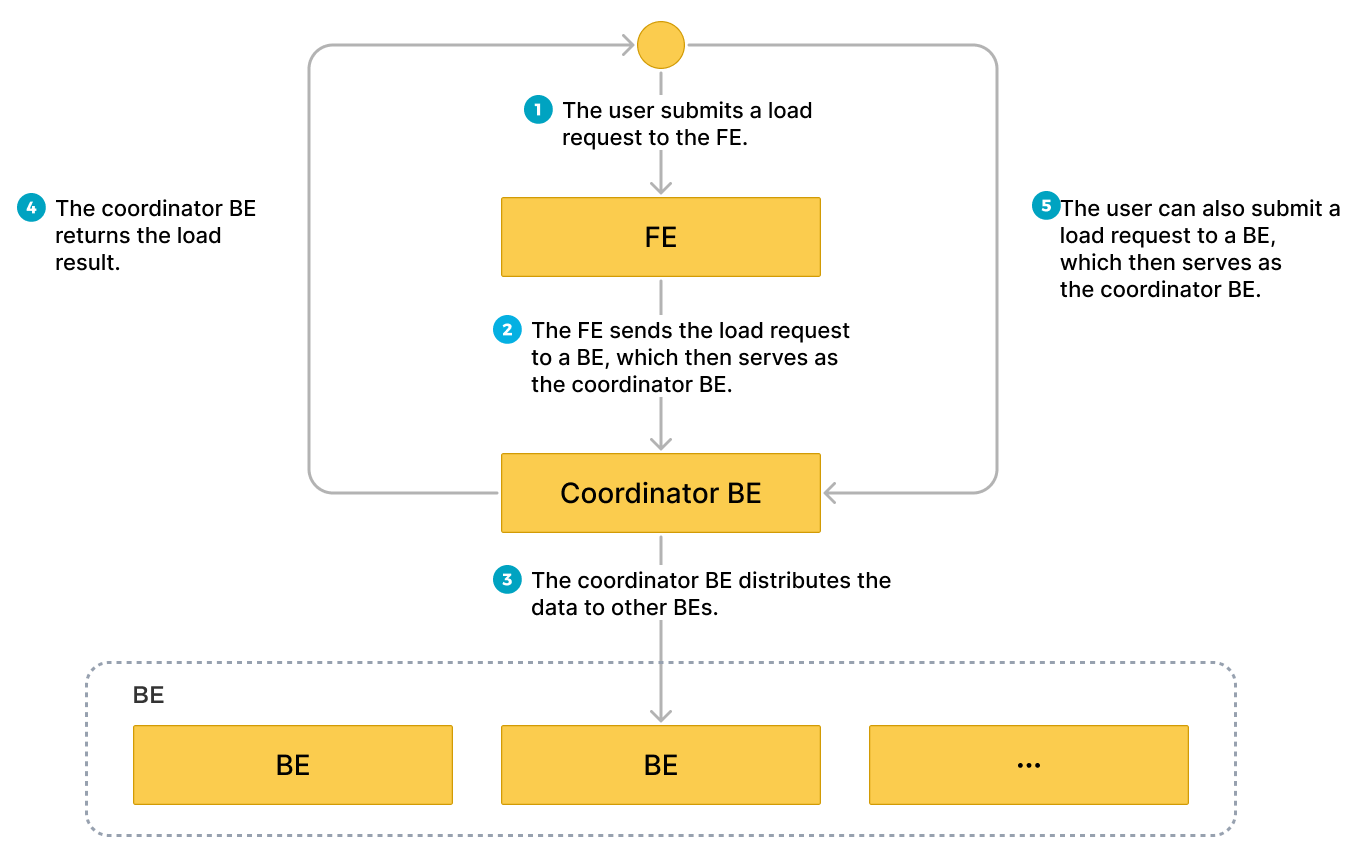
You can submit a load request on your client to an FE according to HTTP, and the FE then uses an HTTP redirect to forward the load request to a specific BE or CN. You can also directly submit a load request on your client to a BE or CN of your choice.
If you submit load requests to an FE, the FE uses a polling mechanism to decide which BE or CN will serve as a coordinator to receive and process the load requests. The polling mechanism helps achieve load balancing within your StarRocks cluster. Therefore, we recommend that you send load requests to an FE.
The BE or CN that receives the load request runs as the Coordinator BE or CN to split data based on the used schema into portions and assign each portion of the data to the other involved BEs or CNs. After the load finishes, the Coordinator BE or CN returns the result of the load job to your client. Note that if you stop the Coordinator BE or CN during the load, the load job fails.
The following figure shows the workflow of a Stream Load job.
Limits
Stream Load does not support loading the data of a CSV file that contains a JSON-formatted column.
Typical example
This section uses curl as an example to describe how to load the data of a CSV or JSON file from your local file system into StarRocks. For detailed syntax and parameter descriptions, see STREAM LOAD.
Note that in StarRocks some literals are used as reserved keywords by the SQL language. Do not directly use these keywords in SQL statements. If you want to use such a keyword in an SQL statement, enclose it in a pair of backticks (`). See Keywords.
Load CSV data
Prepare datasets
In your local file system, create a CSV file named example1.csv. The file consists of three columns, which represent the user ID, user name, and user score in sequence.
1,Lily,23
2,Rose,23
3,Alice,24
4,Julia,25
Create a database and a table
Create a database and switch to it:
CREATE DATABASE IF NOT EXISTS mydatabase;
USE mydatabase;
Create a Primary Key table named table1. The table consists of three columns: id, name, and score, of which id is the primary key.
CREATE TABLE `table1`
(
    `id` int(11) NOT NULL COMMENT "user ID",
    `name` varchar(65533) NULL COMMENT "user name",
    `score` int(11) NOT NULL COMMENT "user score"
)
ENGINE=OLAP
PRIMARY KEY(`id`)
DISTRIBUTED BY HASH(`id`);
Since v2.5.7, StarRocks can automatically set the number of buckets (BUCKETS) when you create a table or add a partition. You no longer need to manually set the number of buckets. For detailed information, see set the number of buckets.
Start a Stream Load
Run the following command to load the data of example1.csv into table1:
curl --location-trusted -u <username>:<password> -H "label:123" \
    -H "Expect:100-continue" \
    -H "column_separator:," \
    -H "columns: id, name, score" \
    -T example1.csv -XPUT \
    http://<fe_host>:<fe_http_port>/api/mydatabase/table1/_stream_load
- If you use an account for which no password is set, you need to input only
<username>:. - You can use SHOW FRONTENDS to view the IP address and HTTP port of the FE node.
example1.csv consists of three columns, which are separated by commas (,) and can be mapped in sequence onto the id, name, and score columns of table1. Therefore, you need to use the column_separator parameter to specify the comma (,) as the column separator. You also need to use the columns parameter to temporarily name the three columns of example1.csv as id, name, and score, which are mapped in sequence onto the three columns of table1.
After the load is complete, you can query table1 to verify that the load is successful:
SELECT * FROM table1;
+------+-------+-------+
| id   | name  | score |
+------+-------+-------+
|    1 | Lily  |    23 |
|    2 | Rose  |    23 |
|    3 | Alice |    24 |
|    4 | Julia |    25 |
+------+-------+-------+
4 rows in set (0.00 sec)
Load JSON data
Since v3.2.7, Stream Load supports compressing JSON data during transmission, reducing network bandwidth overhead. Users can specify different compression algorithms using parameters compression and Content-Encoding. Supported compression algorithms including GZIP, BZIP2, LZ4_FRAME, and ZSTD. For the syntax, see STREAM LOAD.
Prepare datasets
In your local file system, create a JSON file named example2.json. The file consists of two columns, which represent city ID and city name in sequence.
{"name": "Beijing", "code": 2}
Create a database and a table
Create a database and switch to it:
CREATE DATABASE IF NOT EXISTS mydatabase;
USE mydatabase;
Create a Primary Key table named table2. The table consists of two columns: id and city, of which id is the primary key.
CREATE TABLE `table2`
(
    `id` int(11) NOT NULL COMMENT "city ID",
    `city` varchar(65533) NULL COMMENT "city name"
)
ENGINE=OLAP
PRIMARY KEY(`id`)
DISTRIBUTED BY HASH(`id`);
Since v2.5.7, StarRocks can set the number of(BUCKETS) automatically when you create a table or add a partition. You no longer need to manually set the number of buckets. For detailed information, see set the number of buckets.
Start a Stream Load
Run the following command to load the data of example2.json into table2:
curl -v --location-trusted -u <username>:<password> -H "strict_mode: true" \
    -H "Expect:100-continue" \
    -H "format: json" -H "jsonpaths: [\"$.name\", \"$.code\"]" \
    -H "columns: city,tmp_id, id = tmp_id * 100" \
    -T example2.json -XPUT \
    http://<fe_host>:<fe_http_port>/api/mydatabase/table2/_stream_load
- If you use an account for which no password is set, you need to input only
<username>:. - You can use SHOW FRONTENDS to view the IP address and HTTP port of the FE node.
example2.json consists of two keys, name and code, which are mapped onto the id and city columns of table2, as shown in the following figure.
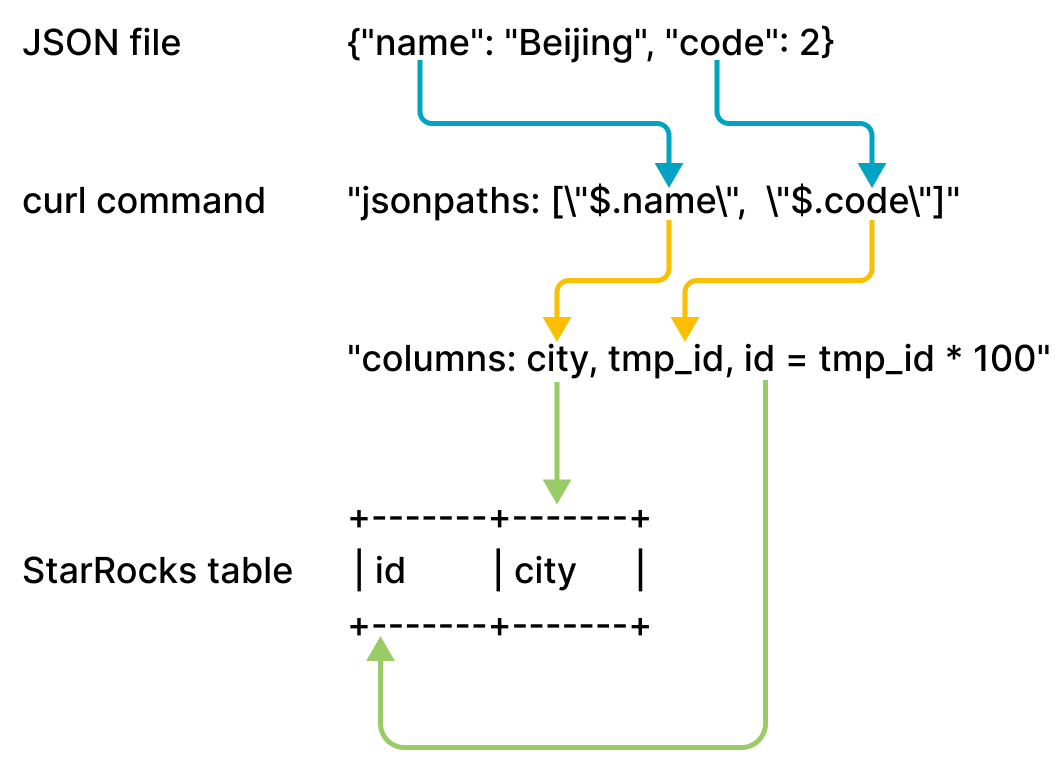
The mappings shown in the preceding figure are described as follows:
-
StarRocks extracts the
nameandcodekeys ofexample2.jsonand maps them onto thenameandcodefields declared in thejsonpathsparameter. -
StarRocks extracts the
nameandcodefields declared in thejsonpathsparameter and maps them in sequence onto thecityandtmp_idfields declared in thecolumnsparameter. -
StarRocks extracts the
cityandtmp_idfields declared in thecolumnsparameter and maps them by name onto thecityandidcolumns oftable2.
In the preceding example, the value of code in example2.json is multiplied by 100 before it is loaded into the id column of table2.
For detailed mappings between jsonpaths, columns, and the columns of the StarRocks table, see the "Column mappings" section in STREAM LOAD.
After the load is complete, you can query table2 to verify that the load is successful:
SELECT * FROM table2;
+------+--------+
| id   | city   |
+------+--------+
| 200  | Beijing|
+------+--------+
4 rows in set (0.01 sec)
Merge Stream Load requests
From v3.4.0, the system supports merging multiple Stream Load requests.
Note that the Merge Commit optimization is suitable for the scenario with concurrent Stream Load jobs on a single table. It is not recommended if the concurrency is one. Meanwhile, think twice before setting merge_commit_async to false and merge_commit_interval_ms to a large value because they may cause load performance degradation.
Merge Commit is an optimization for Stream Load, designed for high concurrency, small-batch (from KB to tens of MB) real-time loading scenarios. In earlier versions, each Stream Load request would generate a transaction and a data version, which led to the following issues in high concurrency loading scenarios:
- Excessive data versions impact query performance, and limiting the number of versions may cause
too many versionserrors. - Data version merging through Compaction increases resource consumption.
- It generates small files, increasing IOPS and I/O latency. And in shared-data clusters, this also raises cloud object storage costs.
- Leader FE node, as the transaction manager, may become a single point of bottleneck.
Merge Commit mitigates these issues by merging multiple concurrent Stream Load requests within a time window into a single transaction. This reduces the number of transactions and versions generated by high concurrency requests, thereby improving loading performance.
Merge Commit supports both synchronous and asynchronous modes. Each mode has advantages and disadvantages. You can choose based on your use cases.
-
Synchronous mode
The server returns only after the merged transaction is committed, ensuring the loading is successful and visible.
-
Asynchronous mode
The server returns immediately after receiving the data. This mode does not ensure the loading is successful.
| Mode | Advantages | Disadvantages |
|---|---|---|
| Synchronous |
| Each loading request from the client is blocked until the server closes the merge window. It may reduce the data processing capability of a single client if the window is excessively large. |
| Asynchronous | Allows a single client to send subsequent loading requests without waiting for the server to close the merge window, improving loading throughput. |
|
Start a Stream Load
-
Run the following command to start a Stream Load job with Merge Commit enabled in synchronous mode, and set the merging window to
5000milliseconds and degree of parallelism to2:curl --location-trusted -u <username>:<password> \
-H "Expect:100-continue" \
-H "column_separator:," \
-H "columns: id, name, score" \
-H "enable_merge_commit:true" \
-H "merge_commit_interval_ms:5000" \
-H "merge_commit_parallel:2" \
-T example1.csv -XPUT \
http://<fe_host>:<fe_http_port>/api/mydatabase/table1/_stream_load -
Run the following command to start a Stream Load job with Merge Commit enabled in asynchronous mode, and set the merging window to
60000milliseconds and degree of parallelism to2:curl --location-trusted -u <username>:<password> \
-H "Expect:100-continue" \
-H "column_separator:," \
-H "columns: id, name, score" \
-H "enable_merge_commit:true" \
-H "merge_commit_async:true" \
-H "merge_commit_interval_ms:60000" \
-H "merge_commit_parallel:2" \
-T example1.csv -XPUT \
http://<fe_host>:<fe_http_port>/api/mydatabase/table1/_stream_load
- Merge Commit only supports merging homogeneous loading requests into a single database and table. "Homogeneous" indicates that the Stream Load parameters are identical, including: common parameters, JSON format parameters, CSV format parameters,
opt_properties, and Merge Commit parameters. - For loading CSV-formatted data, you must ensure that each row ends with a line separator.
skip_headeris not supported. - The server automatically generates labels for transactions. They will be ignored if specified.
- Merge Commit merges multiple loading requests into a single transaction. If one request contains data quality issues, all requests in the transaction will fail.
Check Stream Load progress
After a load job is complete, StarRocks returns the result of the job in JSON format. For more information, see the "Return value" section in STREAM LOAD.
Stream Load does not allow you to query the result of a load job by using the SHOW LOAD statement.
Cancel a Stream Load job
Stream Load does not allow you to cancel a load job. If a load job times out or encounters errors, StarRocks automatically cancels the job.
Parameter configurations
This section describes some system parameters that you need to configure if you choose the loading method Stream Load. These parameter configurations take effect on all Stream Load jobs.
-
streaming_load_max_mb: the maximum size of each data file you want to load. The default maximum size is 10 GB. For more information, see Configure BE or CN dynamic parameters.We recommend that you do not load more than 10 GB of data at a time. If the size of a data file exceeds 10 GB, we recommend that you split the data file into small files that each are less than 10 GB in size and then load these files one by one. If you cannot split a data file greater than 10 GB, you can increase the value of this parameter based on the file size.
After you increase the value of this parameter, the new value can take effect only after you restart the BEs or CNs of your StarRocks cluster. Additionally, system performance may deteriorate, and the costs of retries in the event of load failures also increase.
noteWhen you load the data of a JSON file, take note of the following points:
-
The size of each JSON object in the file cannot exceed 4 GB. If any JSON object in the file exceeds 4 GB, StarRocks throws an error "This parser can't support a document that big."
-
By default, the JSON body in an HTTP request cannot exceed 100 MB. If the JSON body exceeds 100 MB, StarRocks throws an error "The size of this batch exceed the max size [104857600] of json type data data [8617627793]. Set ignore_json_size to skip check, although it may lead huge memory consuming." To prevent this error, you can add
"ignore_json_size:true"in the HTTP request header to ignore the check on the JSON body size.
-
-
stream_load_default_timeout_second: the timeout period of each load job. The default timeout period is 600 seconds. For more information, see Configure FE dynamic parameters.If many of the load jobs that you create time out, you can increase the value of this parameter based on the calculation result that you obtain from the following formula:
Timeout period of each load job > Amount of data to be loaded/Average loading speed
For example, if the size of the data file that you want to load is 10 GB and the average loading speed of your StarRocks cluster is 100 MB/s, set the timeout period to more than 100 seconds.
noteAverage loading speed in the preceding formula is the average loading speed of your StarRocks cluster. It varies depending on the disk I/O and the number of BEs or CNs in your StarRocks cluster.
Stream Load also provides the
timeoutparameter, which allows you to specify the timeout period of an individual load job. For more information, see STREAM LOAD.
Usage notes
If a field is missing for a record in the data file you want to load and the column onto which the field is mapped in your StarRocks table is defined as NOT NULL, StarRocks automatically fills a NULL value in the mapping column of your StarRocks table during the load of the record. You can also use the ifnull() function to specify the default value that you want to fill.
For example, if the field that represents city ID in the preceding example2.json file is missing and you want to fill an x value in the mapping column of table2, you can specify "columns: city, tmp_id, id = ifnull(tmp_id, 'x')".
Loading from a local file system via Broker Load
In addition to Stream Load, you can also use Broker Load to load data from a local file system. This feature is supported from v2.5 onwards.
Broker Load is an asynchronous loading method. After you submit a load job, StarRocks asynchronously runs the job and does not immediately return the job result. You need to query the job result by hand. See Check Broker Load progress.
Limits
- Currently Broker Load supports loading from a local file system only through a single broker whose version is v2.5 or later.
- Highly concurrent queries against a single broker may cause issues such as timeout and OOM. To mitigate the impact, you can use the
pipeline_dopvariable (see System variable) to set the query parallelism for Broker Load. For queries against a single broker, we recommend that you setpipeline_dopto a value smaller than16.
Typical example
Broker Load supports loading from a single data file to a single table, loading from multiple data files to a single table, and loading from multiple data files to multiple tables. This section uses loading from multiple data files to a single table as an example.
Note that in StarRocks some literals are used as reserved keywords by the SQL language. Do not directly use these keywords in SQL statements. If you want to use such a keyword in an SQL statement, enclose it in a pair of backticks (`). See Keywords.
Prepare datasets
Use the CSV file format as an example. Log in to your local file system, and create two CSV files, file1.csv and file2.csv, in a specific storage location (for example, /home/disk1/business/). Both files consist of three columns, which represent the user ID, user name, and user score in sequence.
-
file1.csv1,Lily,21
2,Rose,22
3,Alice,23
4,Julia,24 -
file2.csv5,Tony,25
6,Adam,26
7,Allen,27
8,Jacky,28
Create a database and a table
Create a database and switch to it:
CREATE DATABASE IF NOT EXISTS mydatabase;
USE mydatabase;
Create a Primary Key table named mytable. The table consists of three columns: id, name, and score, of which id is the primary key.
CREATE TABLE `mytable`
(
    `id` int(11) NOT NULL COMMENT "User ID",
    `name` varchar(65533) NULL DEFAULT "" COMMENT "User name",
    `score` int(11) NOT NULL DEFAULT "0" COMMENT "User score"
)
ENGINE=OLAP
PRIMARY KEY(`id`)
DISTRIBUTED BY HASH(`id`)
PROPERTIES("replication_num"="1");
Start a Broker Load
Run the following command to start a Broker Load job that loads data from all data files (file1.csv and file2.csv) stored in the /home/disk1/business/ path of your local file system to the StarRocks table mytable:
LOAD LABEL mydatabase.label_local
(
    DATA INFILE("file:///home/disk1/business/csv/*")
    INTO TABLE mytable
    COLUMNS TERMINATED BY ","
    (id, name, score)
)
WITH BROKER "sole_broker"
PROPERTIES
(
    "timeout" = "3600"
);
This job has four main sections:
LABEL: A string used when querying the state of the load job.LOADdeclaration: The source URI, source data format, and destination table name.PROPERTIES: The timeout value and any other properties to apply to the load job.
For detailed syntax and parameter descriptions, see BROKER LOAD.
Check Broker Load progress
In v3.0 and earlier, use the SHOW LOAD statement or the curl command to view the progress of Broker Load jobs.
In v3.1 and later, you can view the progress of Broker Load jobs from the information_schema.loads view:
SELECT * FROM information_schema.loads;
If you have submitted multiple load jobs, you can filter on the LABEL associated with the job. Example:
SELECT * FROM information_schema.loads WHERE LABEL = 'label_local';
After you confirm that the load job has finished, you can query table to see if the data has been successfully loaded. Example:
SELECT * FROM mytable;
+------+-------+-------+
| id   | name  | score |
+------+-------+-------+
|    3 | Alice |    23 |
|    5 | Tony  |    25 |
|    6 | Adam  |    26 |
|    1 | Lily  |    21 |
|    2 | Rose  |    22 |
|    4 | Julia |    24 |
|    7 | Allen |    27 |
|    8 | Jacky |    28 |
+------+-------+-------+
8 rows in set (0.07 sec)
Cancel a Broker Load job
When a load job is not in the CANCELLED or FINISHED stage, you can use the CANCEL LOAD statement to cancel the job.
For example, you can execute the following statement to cancel a load job, whose label is label_local, in the database mydatabase:
CANCEL LOAD
FROM mydatabase
WHERE LABEL = "label_local";
Loading from NAS via Broker Load
There are two ways to load data from NAS by using Broker Load:
- Consider NAS as a local file system, and run a load job with a broker. See the previous section "Loading from a local system via Broker Load".
- (Recommended) Consider NAS as a cloud storage system, and run a load job without a broker.
This section introduces the second way. Detailed operations are as follows:
-
Mount your NAS device to the same path on all the BE or CN nodes and FE nodes of your StarRocks cluster. As such, all BEs or CNs can access the NAS device like they access their own locally stored files.
-
Use Broker Load to load data from the NAS device to the destination StarRocks table. Example:
LOAD LABEL test_db.label_nas
(
    DATA INFILE("file:///home/disk1/sr/*")
    INTO TABLE mytable
    COLUMNS TERMINATED BY ","
)
WITH BROKER
PROPERTIES
(
    "timeout" = "3600"
);
This job has four main sections:
LABEL: A string used when querying the state of the load job.LOADdeclaration: The source URI, source data format, and destination table name. Note thatDATA INFILEin the declaration is used to specify the mount point folder path of the NAS device, as shown in the above example in whichfile:///is the prefix and/home/disk1/sris the mount point folder path.BROKER: You do not need to specify the broker name.PROPERTIES: The timeout value and any other properties to apply to the load job.
For detailed syntax and parameter descriptions, see BROKER LOAD.
After you submit a job, you can view the load progress or cancel the job as needed. For detailed operations, see "Check Broker Load progress" and "Cancel a Broker Load job in this topic.
