Apache Iceberg レイクハウス
概要
- Docker compose を使用して Object Storage、Apache Spark、Iceberg catalog、StarRocks をデプロイ
- 2023 年 5 月のニューヨーク市グリーンタクシーデータを Iceberg データレイクにロード
- StarRocks を設定して Iceberg catalog にアクセス
- データが存在する場所で StarRocks を使用してデータをクエリ
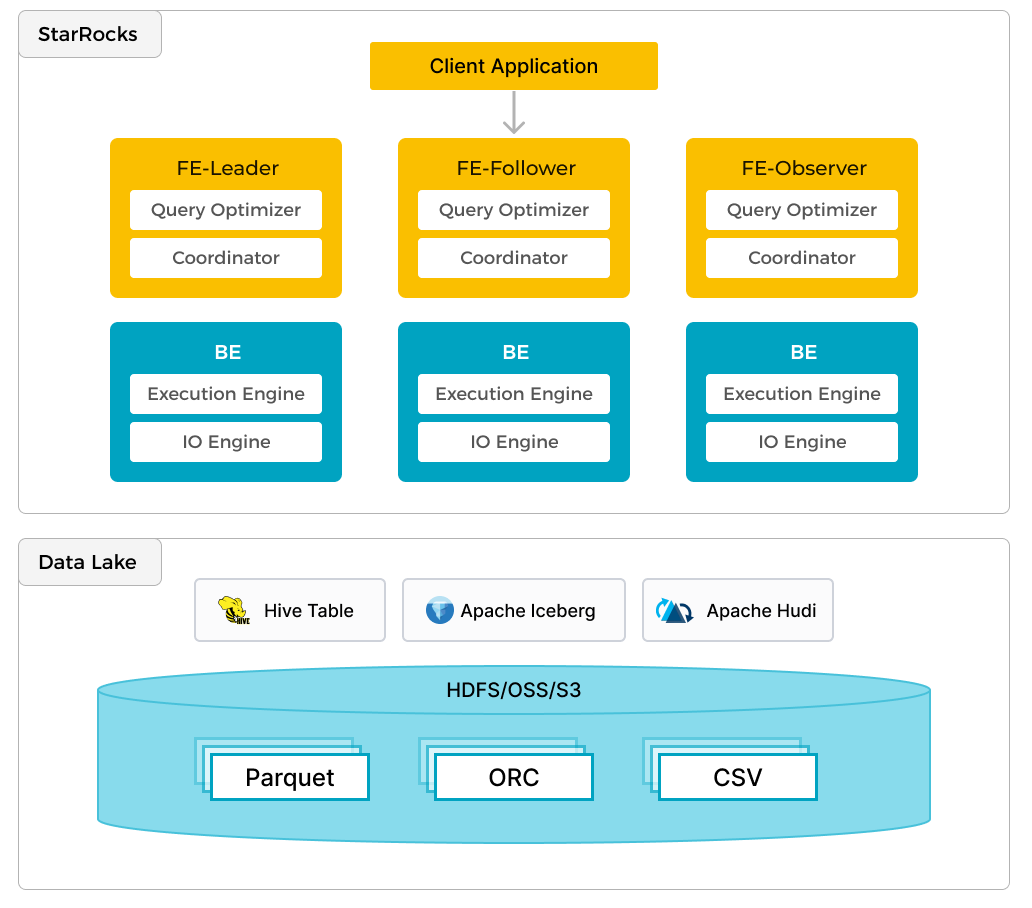
In addition to efficient analytics of local data, StarRocks can work as the compute engine to analyze data stored in data lakes such as Apache Hudi, Apache Iceberg, and Delta Lake. One of the key features of StarRocks is its external catalog, which acts as the linkage to an externally maintained metastore. This functionality provides users with the capability to query external data sources seamlessly, eliminating the need for data migration. As such, users can analyze data from different systems such as HDFS and Amazon S3, in various file formats such as Parquet, ORC, and CSV, etc.
The preceding figure shows a data lake analytics scenario where StarRocks is responsible for data computing and analysis, and the data lake is responsible for data storage, organization, and maintenance. Data lakes allow users to store data in open storage formats and use flexible schemas to produce reports on "single source of truth" for various BI, AI, ad-hoc, and reporting use cases. StarRocks fully leverages the advantages of its vectorization engine and CBO, significantly improving the performance of data lake analytics.
前提条件
Docker
- Docker
- Docker に割り当てられた 5 GB の RAM
- Docker に割り当てられた 20 GB の空きディスクスペース
SQL クライアント
Docker 環境で提供される SQL クライアントを使用するか、システム上のものを使用できます。多くの MySQL 互換クライアントが動作し、このガイドでは DBeaver と MySQL WorkBench の設定をカバーしています。
curl
curl はデータセットをダウンロードするために使用されます。OS のプロンプトで curl または curl.exe を実行してインストールされているか確認してください。curl がインストールされていない場合は、こちらから取得してください。
StarRocks 用語集
FE
フロントエンドノードは、メタデータ管理、クライアント接続管理、クエリプランニング、およびクエリスケジューリングを担当します。各 FE はメモリ内にメタデータの完全なコピーを保存および維持し、FEs 間での無差別なサービスを保証します。
BE
バックエンド (BE) ノードは、データストレージと共有なしデプロイメントでのクエリプランの実行の両方を担当します。このガイドで使用されている Iceberg catalog のような external catalog が使用される場合、BE ノードは external catalog からデータをキャッシュしてクエリを高速化できます。
環境
このガイドでは 6 つのコンテナ (サービス) を使用し、すべて Docker compose でデプロイされます。サービスとその責任は次のとおりです。
| サービス | 責任 |
|---|---|
starrocks-fe | メタデータ管理、クライアント接続、クエリプランとスケジューリング |
starrocks-be | クエリプランの実行 |
rest | Iceberg catalog (メタデータサービス) の提供 |
spark-iceberg | PySpark を実行するための Apache Spark 環境 |
mc | MinIO 設定 (MinIO コマンドラインクライアント) |
minio | MinIO Object Storage |
Docker 構成と NYC グリーンタクシーデータのダウンロード
必要な 3 つのコンテナを提供する環境を提供するために、StarRocks は Docker compose ファイルを提供します。curl を使用して compose ファイルとデータセットをダウンロードします。
Docker compose ファイル:
mkdir iceberg
cd iceberg
curl -O https://raw.githubusercontent.com/StarRocks/demo/master/documentation-samples/iceberg/docker-compose.yml
データセット:
curl -O https://raw.githubusercontent.com/StarRocks/demo/master/documentation-samples/iceberg/datasets/green_tripdata_2023-05.parquet
Docker で環境を開始
このコマンドと他の docker compose コマンドは、docker-compose.yml ファイルを含むディレクトリから実行してください。
docker compose up -d
[+] Building 0.0s (0/0)                     docker:desktop-linux
[+] Running 6/6
 ✔ Container iceberg-rest   Started                         0.0s
 ✔ Container minio          Started                         0.0s
 ✔ Container starrocks-fe   Started                         0.0s
 ✔ Container mc             Started                         0.0s
 ✔ Container spark-iceberg  Started                         0.0s
 ✔ Container starrocks-be   Started
環境のステータスを確認
サービスの進行状況を確認します。FE と BE が正常になるまで約 30 秒かかります。
docker compose ps を実行して、FE と BE が healthy のステータスを示すまで待ちます。他のサービスにはヘルスチェック構成がありませんが、それらと対話することで動作しているかどうかがわかります。
jq がインストールされていて、docker compose ps の短いリストを好む場合は、次を試してください:
docker compose ps --format json | jq '{Service: .Service, State: .State, Status: .Status}'
docker compose ps
SERVICE         CREATED         STATUS                   PORTS
rest            4 minutes ago   Up 4 minutes             0.0.0.0:8181->8181/tcp
mc              4 minutes ago   Up 4 minutes
minio           4 minutes ago   Up 4 minutes             0.0.0.0:9000-9001->9000-9001/tcp
spark-iceberg   4 minutes ago   Up 4 minutes             0.0.0.0:8080->8080/tcp, 0.0.0.0:8888->8888/tcp, 0.0.0.0:10000-10001->10000-10001/tcp
starrocks-be    4 minutes ago   Up 4 minutes (healthy)   0.0.0.0:8040->8040/tcp
starrocks-fe    4 minutes ago   Up 4 minutes (healthy)   0.0.0.0:8030->8030/tcp, 0.0.0.0:9020->9020/tcp, 0.0.0.0:9030->9030/tcp
PySpark
Iceberg と対話する方法はいくつかありますが、このガイドでは PySpark を使用します。PySpark に慣れていない場合は、詳細情報セクションからリンクされているドキュメントがありますが、実行する必要のあるすべてのコマンドが以下に提供されています。
グリーンタクシーデータセット
データを spark-iceberg コンテナにコピーします。このコマンドは、データセットファイルを spark-iceberg サービスの /opt/spark/ ディレクトリにコピーします。
docker compose \
cp green_tripdata_2023-05.parquet spark-iceberg:/opt/spark/
PySpark を起動
このコマンドは spark-iceberg サービスに接続し、pyspark コマンドを実行します。
docker compose exec -it spark-iceberg pyspark
Welcome to
      ____              __
     / __/__  ___ _____/ /__
    _\ \/ _ \/ _ `/ __/  '_/
   /__ / .__/\_,_/_/ /_/\_\   version 3.5.0
      /_/

Using Python version 3.9.18 (main, Nov  1 2023 11:04:44)
Spark context Web UI available at http://6ad5cb0e6335:4041
Spark context available as 'sc' (master = local[*], app id = local-1701967093057).
SparkSession available as 'spark'.
>>>
データセットをデータフレームに読み込む
データフレームは Spark SQL の一部であり、データベーステーブルやスプレッドシートに似たデータ構造を提供します。
グリーンタクシーデータは NYC Taxi and Limousine Commission によって Parquet 形式で提供されます。/opt/spark ディレクトリからファイルをロードし、最初の数レコードを SELECT して最初の 3 行のデータの最初の数列を確認します。これらのコマンドは pyspark セッションで実行する必要があります。コマンド:
- ディスクからデータセットファイルを
dfという名前のデータフレームに読み込む - Parquet ファイルのスキーマを表示
df = spark.read.parquet("/opt/spark/green_tripdata_2023-05.parquet")
df.printSchema()
root
 |-- VendorID: integer (nullable = true)
 |-- lpep_pickup_datetime: timestamp_ntz (nullable = true)
 |-- lpep_dropoff_datetime: timestamp_ntz (nullable = true)
 |-- store_and_fwd_flag: string (nullable = true)
 |-- RatecodeID: long (nullable = true)
 |-- PULocationID: integer (nullable = true)
 |-- DOLocationID: integer (nullable = true)
 |-- passenger_count: long (nullable = true)
 |-- trip_distance: double (nullable = true)
 |-- fare_amount: double (nullable = true)
 |-- extra: double (nullable = true)
 |-- mta_tax: double (nullable = true)
 |-- tip_amount: double (nullable = true)
 |-- tolls_amount: double (nullable = true)
 |-- ehail_fee: double (nullable = true)
 |-- improvement_surcharge: double (nullable = true)
 |-- total_amount: double (nullable = true)
 |-- payment_type: long (nullable = true)
 |-- trip_type: long (nullable = true)
 |-- congestion_surcharge: double (nullable = true)

>>>
最初の数 (7) 列の最初の数 (3) 行のデータを確認します。
df.select(df.columns[:7]).show(3)
+--------+--------------------+---------------------+------------------+----------+------------+------------+
|VendorID|lpep_pickup_datetime|lpep_dropoff_datetime|store_and_fwd_flag|RatecodeID|PULocationID|DOLocationID|
+--------+--------------------+---------------------+------------------+----------+------------+------------+
|       2| 2023-05-01 00:52:10|  2023-05-01 01:05:26|                 N|         1|         244|         213|
|       2| 2023-05-01 00:29:49|  2023-05-01 00:50:11|                 N|         1|          33|         100|
|       2| 2023-05-01 00:25:19|  2023-05-01 00:32:12|                 N|         1|         244|         244|
+--------+--------------------+---------------------+------------------+----------+------------+------------+
only showing top 3 rows
テーブルへの書き込み
このステップで作成されるテーブルは、次のステップで StarRocks で利用可能になる catalog に含まれます。
- Catalog:
demo - Database:
nyc - Table:
greentaxis
df.writeTo("demo.nyc.greentaxis").create()
StarRocks を Iceberg Catalog にアクセスするように設定
PySpark からは今すぐ退出するか、SQL コマンドを実行するために新しいターミナルを開くことができます。新しいターミナルを開く場合は、続行する前に docker-compose.yml ファイルを含む quickstart ディレクトリにディレクトリを変更してください。
SQL クライアントで StarRocks に接続
SQL クライアント
These three clients are tested with this tutorial, you only need one:
- mysql CLI: You can run this from the Docker environment or your machine.
- DBeaver is available as a community version and a Pro version.
- MySQL Workbench
Configuring the client
- mysql CLI
- DBeaver
- MySQL Workbench
The easiest way to use the mysql CLI is to run it from the StarRocks container starrocks-fe:
docker compose exec starrocks-fe \
mysql -P 9030 -h 127.0.0.1 -u root --prompt="StarRocks > "
All docker compose commands must be run from the directory containing the docker-compose.yml file.
If you would like to install the mysql CLI expand mysql client install below:
mysql client install
- macOS: If you use Homebrew and do not need MySQL Server run
brew install mysqlto install the CLI. - Linux: Check your repository system for the
mysqlclient. For example,yum install mariadb. - Microsoft Windows: Install the MySQL Community Server and run the provided client, or run
mysqlfrom WSL.
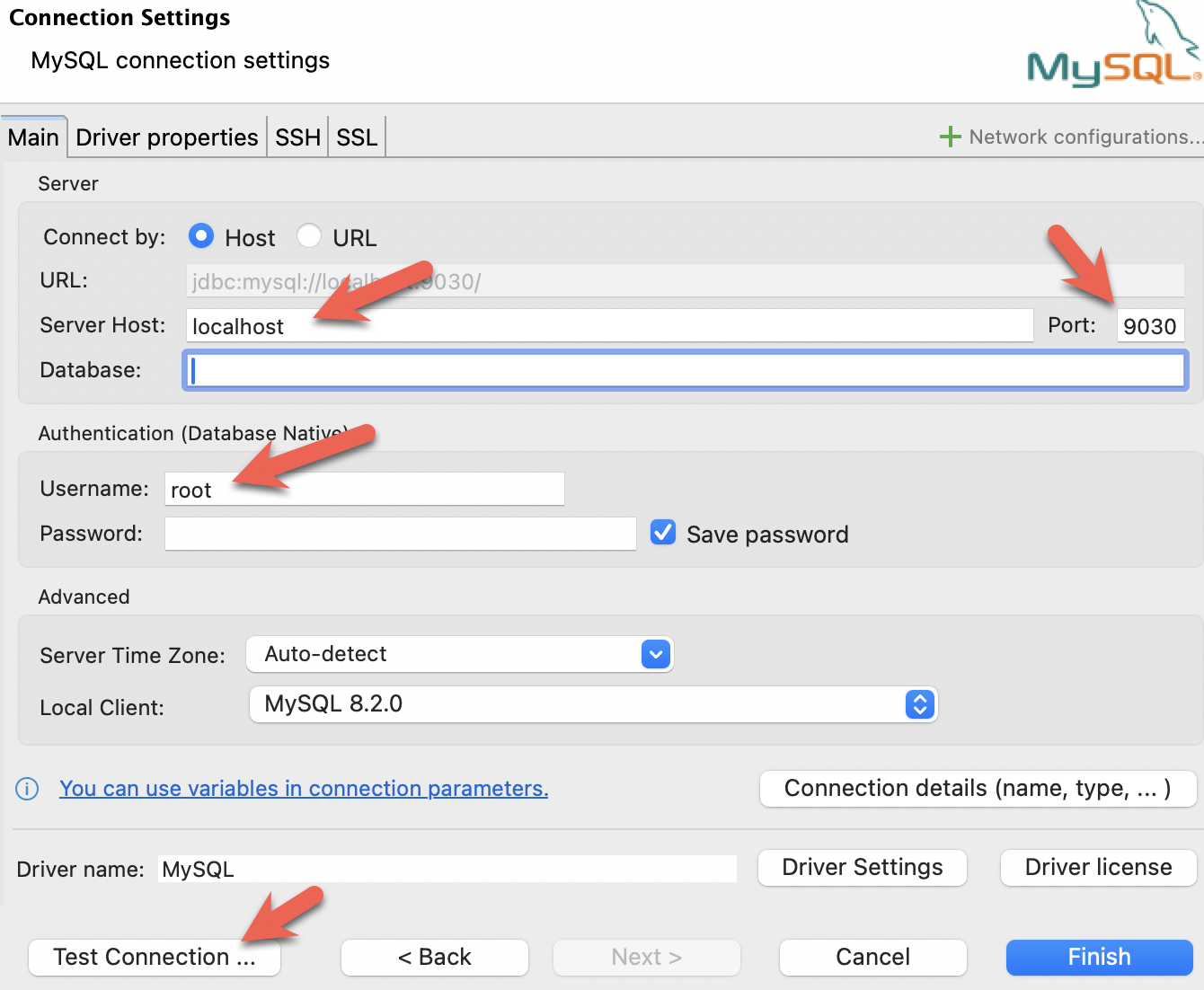
- Install DBeaver, and add a connection:

- Configure the port, IP, and username. Test the connection, and click Finish if the test succeeds:
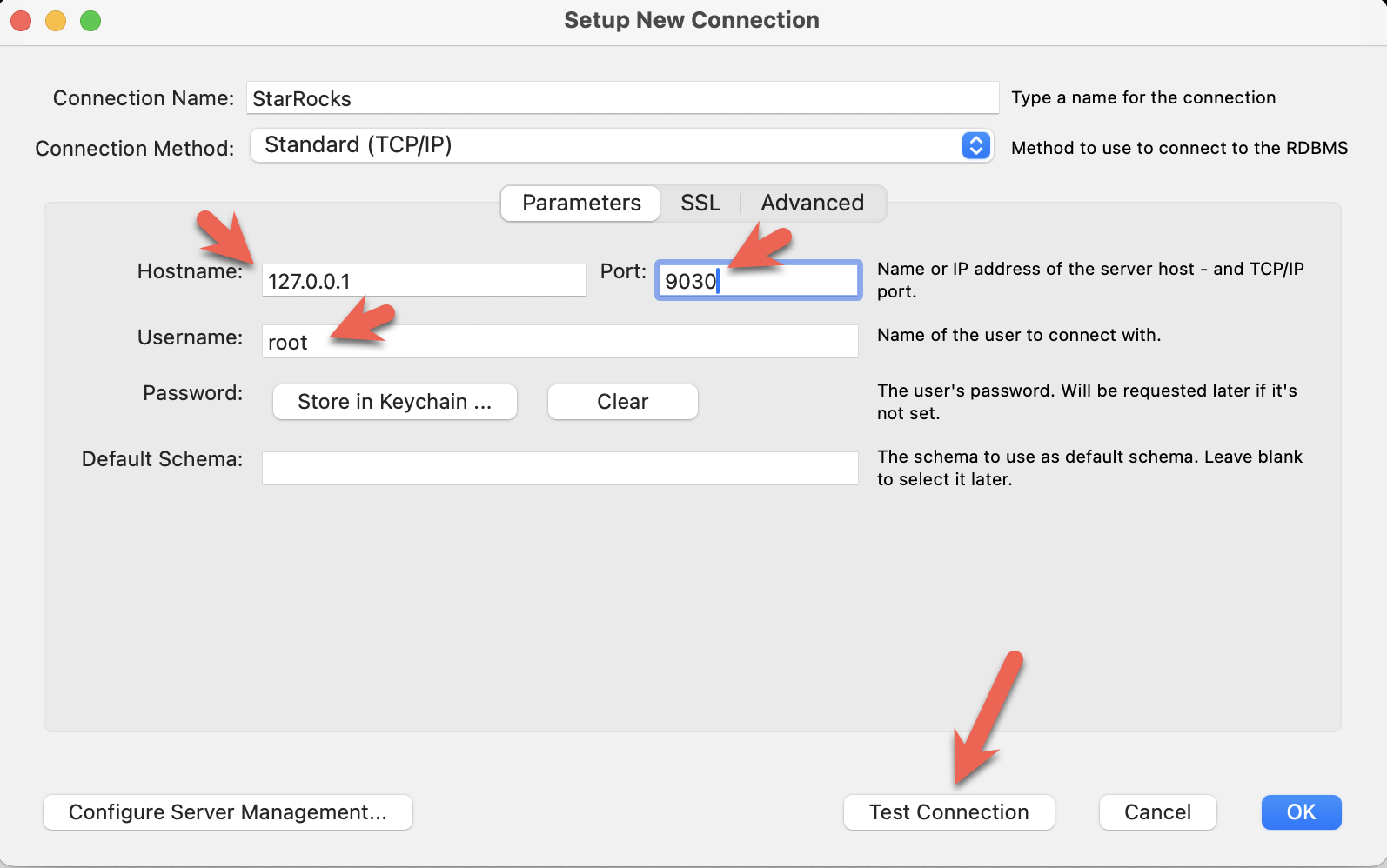
- Install the MySQL Workbench, and add a connection.
- Configure the port, IP, and username and then test the connection:
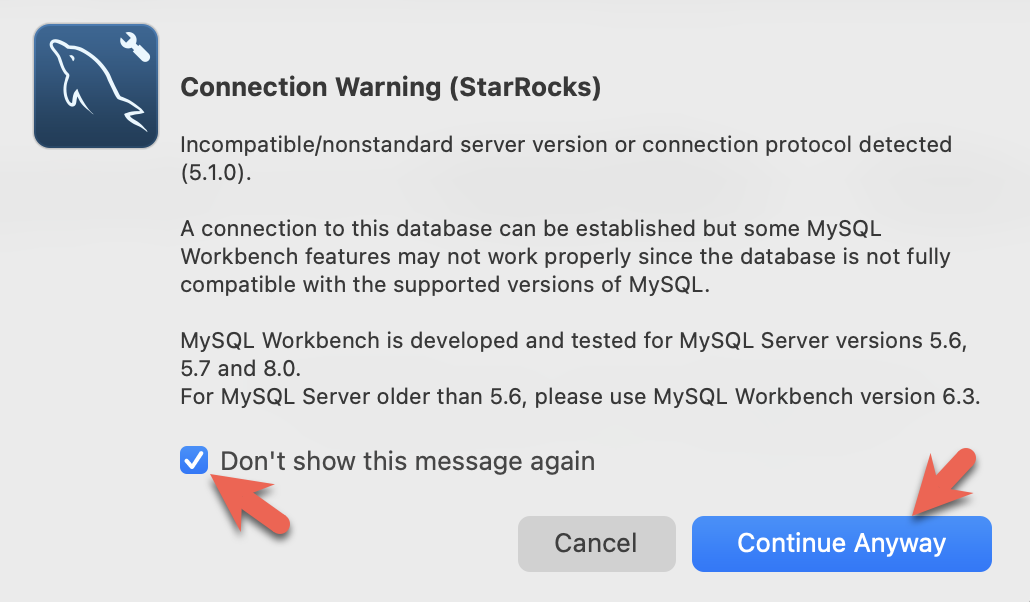
- You will see warnings from the Workbench as it is checking for a specific MySQL version. You can ignore the warnings and when prompted, you can configure Workbench to stop displaying the warnings:
PySpark セッションを終了し、StarRocks に接続できます。
このコマンドは、docker-compose.yml ファイルを含むディレクトリから実行してください。
mysql CLI 以外のクライアントを使用している場合は、今すぐ開いてください。
docker compose exec starrocks-fe \
  mysql -P 9030 -h 127.0.0.1 -u root --prompt="StarRocks > "
StarRocks >
external catalog を作成
external catalog は、StarRocks が Iceberg データを StarRocks のデータベースやテーブルにあるかのように操作できるようにする構成です。個々の構成プロパティはコマンドの後に詳述されます。
CREATE EXTERNAL CATALOG 'iceberg'
PROPERTIES
(
  "type"="iceberg",
  "iceberg.catalog.type"="rest",
  "iceberg.catalog.uri"="http://iceberg-rest:8181",
  "iceberg.catalog.warehouse"="warehouse",
  "aws.s3.access_key"="admin",
  "aws.s3.secret_key"="password",
  "aws.s3.endpoint"="http://minio:9000",
  "aws.s3.enable_path_style_access"="true",
  "client.factory"="com.starrocks.connector.iceberg.IcebergAwsClientFactory"
);
PROPERTIES
| プロパティ | 説明 |
|---|---|
type | この例ではタイプは iceberg です。他のオプションには Hive、Hudi、Delta Lake、JDBC があります。 |
iceberg.catalog.type | この例では rest が使用されます。Tabular は使用される Docker イメージを提供し、Tabular は REST を使用します。 |
iceberg.catalog.uri | REST サーバーのエンドポイント。 |
iceberg.catalog.warehouse | Iceberg catalog の識別子。この場合、compose ファイルで指定されたウェアハウス名は warehouse です。 |
aws.s3.access_key | MinIO キー。この場合、キーとパスワードは compose ファイルで admin |
aws.s3.secret_key | と password に設定されています。 |
aws.s3.endpoint | MinIO エンドポイント。 |
aws.s3.enable_path_style_access | MinIO を Object Storage として使用する場合、これが必要です。MinIO はこの形式 http://host:port/<bucket_name>/<key_name> を期待します。 |
client.factory | このプロパティを iceberg.IcebergAwsClientFactory に設定することで、aws.s3.access_key と aws.s3.secret_key パラメータが認証に使用されます。 |
SHOW CATALOGS;
+-----------------+----------+------------------------------------------------------------------+
| Catalog         | Type     | Comment                                                          |
+-----------------+----------+------------------------------------------------------------------+
| default_catalog | Internal | An internal catalog contains this cluster's self-managed tables. |
| iceberg         | Iceberg  | NULL                                                             |
+-----------------+----------+------------------------------------------------------------------+
2 rows in set (0.03 sec)
SET CATALOG iceberg;
SHOW DATABASES;
表示されるデータベースは、PySpark セッションで作成されました。CATALOG iceberg を追加すると、データベース nyc が StarRocks で表示可能になりました。
+----------+
| Database |
+----------+
| nyc      |
+----------+
1 row in set (0.07 sec)
USE nyc;
Reading table information for completion of table and column names
You can turn off this feature to get a quicker startup with -A

Database changed
SHOW TABLES;
+---------------+
| Tables_in_nyc |
+---------------+
| greentaxis    |
+---------------+
1 rows in set (0.05 sec)
DESCRIBE greentaxis;
StarRocks が使用するスキーマを、以前の PySpark セッションからの df.printSchema() の出力と比較してください。Spark の timestamp_ntz データ型は StarRocks の DATETIME などとして表されます。
+-----------------------+------------------+------+-------+---------+-------+
| Field                 | Type             | Null | Key   | Default | Extra |
+-----------------------+------------------+------+-------+---------+-------+
| VendorID              | INT              | Yes  | false | NULL    |       |
| lpep_pickup_datetime  | DATETIME         | Yes  | false | NULL    |       |
| lpep_dropoff_datetime | DATETIME         | Yes  | false | NULL    |       |
| store_and_fwd_flag    | VARCHAR(1048576) | Yes  | false | NULL    |       |
| RatecodeID            | BIGINT           | Yes  | false | NULL    |       |
| PULocationID          | INT              | Yes  | false | NULL    |       |
| DOLocationID          | INT              | Yes  | false | NULL    |       |
| passenger_count       | BIGINT           | Yes  | false | NULL    |       |
| trip_distance         | DOUBLE           | Yes  | false | NULL    |       |
| fare_amount           | DOUBLE           | Yes  | false | NULL    |       |
| extra                 | DOUBLE           | Yes  | false | NULL    |       |
| mta_tax               | DOUBLE           | Yes  | false | NULL    |       |
| tip_amount            | DOUBLE           | Yes  | false | NULL    |       |
| tolls_amount          | DOUBLE           | Yes  | false | NULL    |       |
| ehail_fee             | DOUBLE           | Yes  | false | NULL    |       |
| improvement_surcharge | DOUBLE           | Yes  | false | NULL    |       |
| total_amount          | DOUBLE           | Yes  | false | NULL    |       |
| payment_type          | BIGINT           | Yes  | false | NULL    |       |
| trip_type             | BIGINT           | Yes  | false | NULL    |       |
| congestion_surcharge  | DOUBLE           | Yes  | false | NULL    |       |
+-----------------------+------------------+------+-------+---------+-------+
20 rows in set (0.04 sec)
StarRocks ドキュメントの SQL クエリの一部は、セミコロンの代わりに \G で終わります。\G は mysql CLI にクエリ結果を縦に表示させます。
多くの SQL クライアントは縦のフォーマット出力を解釈しないため、mysql CLI を使用していない場合は \G を ; に置き換えるべきです。
StarRocks でクエリ
ピックアップ日時の形式を確認
SELECT lpep_pickup_datetime FROM greentaxis LIMIT 10;
+----------------------+
| lpep_pickup_datetime |
+----------------------+
| 2023-05-01 00:52:10  |
| 2023-05-01 00:29:49  |
| 2023-05-01 00:25:19  |
| 2023-05-01 00:07:06  |
| 2023-05-01 00:43:31  |
| 2023-05-01 00:51:54  |
| 2023-05-01 00:27:46  |
| 2023-05-01 00:27:14  |
| 2023-05-01 00:24:14  |
| 2023-05-01 00:46:55  |
+----------------------+
10 rows in set (0.07 sec)
忙しい時間帯を見つける
このクエリは、1日の時間ごとにトリップを集計し、1日の最も忙しい時間が18:00であることを示します。
SELECT COUNT(*) AS trips,
       hour(lpep_pickup_datetime) AS hour_of_day
FROM greentaxis
GROUP BY hour_of_day
ORDER BY trips DESC;
+-------+-------------+
| trips | hour_of_day |
+-------+-------------+
|  5381 |          18 |
|  5253 |          17 |
|  5091 |          16 |
|  4736 |          15 |
|  4393 |          14 |
|  4275 |          19 |
|  3893 |          12 |
|  3816 |          11 |
|  3685 |          13 |
|  3616 |           9 |
|  3530 |          10 |
|  3361 |          20 |
|  3315 |           8 |
|  2917 |          21 |
|  2680 |           7 |
|  2322 |          22 |
|  1735 |          23 |
|  1202 |           6 |
|  1189 |           0 |
|   806 |           1 |
|   606 |           2 |
|   513 |           3 |
|   451 |           5 |
|   408 |           4 |
+-------+-------------+
24 rows in set (0.08 sec)
まとめ
このチュートリアルでは、StarRocks external catalog を使用して、Iceberg REST catalog を使用してデータをそのままクエリできることを示しました。Hive、Hudi、Delta Lake、JDBC catalog を使用した他の多くの統合が利用可能です。
このチュートリアルで行ったこと:
- Docker で StarRocks と Iceberg/PySpark/MinIO 環境をデプロイ
- StarRocks external catalog を設定して Iceberg catalog へのアクセスを提供
- ニューヨーク市が提供するタクシーデータを Iceberg データレイクにロード
- データレイクからデータをコピーせずに StarRocks で SQL を使用してデータをクエリ
詳細情報
Apache Iceberg ドキュメント および クイックスタート (PySpark を含む)
グリーンタクシートリップ記録 データセットは、ニューヨーク市によってこれらの 利用規約 および プライバシーポリシー に基づいて提供されます。
